
QR code marketing materials
QR Codes on Flyers and Brochures in 2026
How small businesses can turn printed interest into customer questions, better follow-up, and clearer next steps.
A flyer does not fail because print is dead. It fails when the person who is interested still cannot get the one answer they need before taking the next step.
That is the real opportunity behind QR codes on flyers and brochures. The QR code is not decoration. It is a bridge between a short printed message and the specific question the reader has in that moment.
Most flyer QR advice stops at size, contrast, placement, and whether the QR code should be static or dynamic. Those details matter. But for a small business, the bigger question is simpler: after someone scans, can they actually ask what they want to know?
If the answer is no, the flyer has only moved the reader from one static page to another. If the answer is yes, the flyer can become a lightweight customer-service, lead-qualification, and demand-research channel.
RealLink AI is useful in that second version. Instead of sending every flyer scan to a generic homepage, you can connect the QR code to an AI employee trained on your approved business information. A prospect can ask about pricing basics, service area, menu items, appointment availability, event details, product options, parking, policies, or next steps. You can then review the questions people asked and improve the next print run.
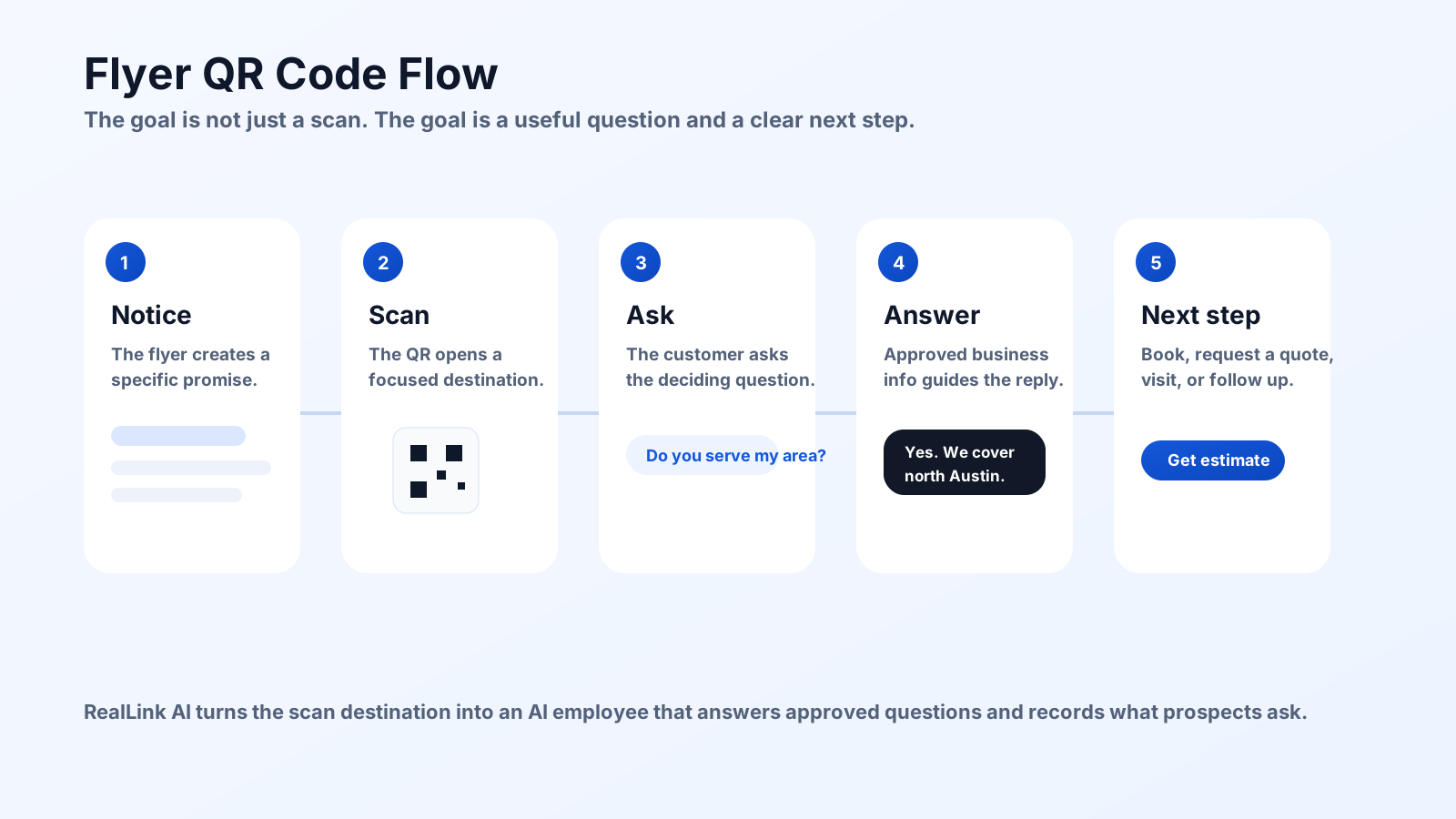
The Search Gap: Most QR Flyer Advice Is Too Mechanical
Current search results for flyer QR codes are heavily focused on mechanics: where to place the code, how large it should be, what file type to export, and how to keep it scannable. That is necessary advice, especially before printing hundreds or thousands of copies.
But it misses the decision that affects business results: what the scan experience is supposed to do.
A QR code on a flyer can send people to:
- a homepage
- a PDF brochure
- a booking page
- a coupon page
- a social profile
- a product page
- a contact form
- a conversational question page
Only some of those destinations match the way people read flyers. A flyer is usually scanned quickly, held in one hand, read near a counter, picked up at an event, left in a mailbox, handed out in a neighborhood, or taken home for later. The reader is rarely in a patient "browse the full website" mindset.
That is why a flyer QR code should usually answer one of these intents:
- "Is this for me?"
- "How much does it cost?"
- "Are you available near me?"
- "Can I ask about my situation?"
- "What happens if I scan now?"
- "What is the next step if I am interested?"
A flyer is short. A question path can be deep.
Start With One Scan Promise
The most important QR code copy on a flyer is not the word "scan." It is the promise next to the code.
Weak flyer QR copy sounds like this:
- Scan me
- Learn more
- Visit our website
- More info
- Follow us
Those phrases are not wrong, but they are vague. They ask the reader to do work without saying what they will get.
Better flyer QR copy uses a specific scan promise:
- Scan to ask about services and pricing
- Scan to check if we serve your area
- Scan to ask about today's menu
- Scan to see full event details
- Scan to ask what option fits you
- Scan for booking, parking, and hours
- Scan to ask in your language
- Scan before you call
Each version gives the reader a reason. More importantly, each version tells the business what the QR destination needs to handle.
A flyer QR code should not promise "more information." It should promise the next useful answer.
What a Flyer QR Code Should Link To
The best QR destination depends on the offer and the reader's stage of interest. A new-customer service flyer should not behave like an event poster. A clinic brochure should not behave like a restaurant menu. A retail promotion should not behave like a contractor estimate page.
Use this simple decision rule:
- If the reader mainly needs facts, link to a focused information page.
- If the reader is ready to act, link to booking, quote, purchase, or RSVP.
- If the reader may have fit questions, link to a question-answering flow.
- If the reader needs trust, link to examples, reviews, proof, policies, or a comparison guide.
- If the reader may speak another language, link to a multilingual question path.
For many small businesses, the question-answering flow is the best middle ground. It does not force the reader to call immediately, and it does not leave them alone on a generic page.
That is where RealLink AI fits naturally. A RealLink AI page can answer approved questions about your business, guide the person toward a next step, and keep question patterns visible so the flyer becomes measurable research, not only a print expense.
Plan the QR path before you print
Use the free Flyer QR Code Planner to create the scan promise, placement notes, customer questions, campaign label, and print checklist before your designer places the QR code. Before you approve the final artwork, run the image through the free Flyer Color Psychology Analyzer to check first impression, readability, and whether the QR or phone area stands out clearly. When the plan is ready, generate the branded QR asset locally in your browser.
Print Rules That Matter Before You Order Flyers
Design quality matters, but scan reliability comes first. A beautiful flyer with a weak QR code still fails at the moment of action.
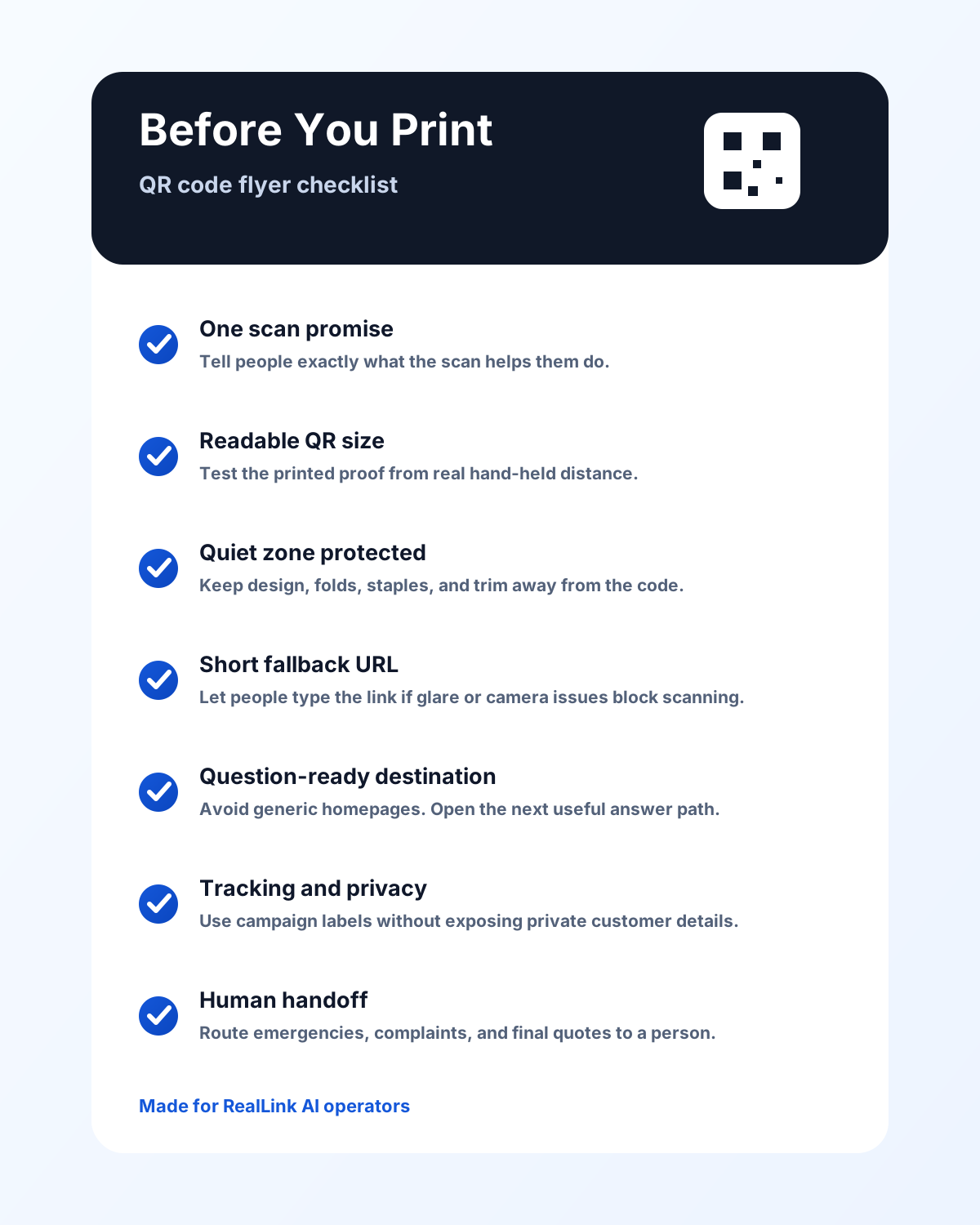
Protect the quiet zone
DENSO WAVE's QR guidance explains that a QR code needs a clear margin around the symbol. It describes this clear area as the "quiet zone" and says QR codes require a four-module wide margin on all sides.
For flyer design, that means no photos, borders, decorative shapes, trim lines, fold lines, or text should touch the QR code. If your designer wants the QR code to feel integrated, use a frame outside the quiet zone rather than crowding the code itself.
Keep the code large enough for the context
There is no universal flyer size because the scanning distance, print quality, data length, error correction, paper finish, and phone camera all matter. For a normal hand-held flyer, start around 1.25 to 1.5 inches when space allows. For a small brochure panel, avoid shrinking below the point where the printed proof scans easily from a natural hand-held distance.
The practical rule is simple: print a proof, step back to the real use distance, scan with more than one phone, and test in the lighting where the flyer will be used.
Use strong contrast
Dark code on a light background is the safest default. If you use brand colors, test them. Avoid low-contrast combinations, busy photo backgrounds, glossy glare, and reversed light-on-dark QR codes unless you have tested the exact printed version.
Do not place the QR code near folds or staples
Brochures create extra risk because folds can run through a QR area. Handouts can also be stapled, clipped, crumpled, or tucked into bags. Put the QR code in a protected, flat part of the layout with enough breathing room.
Add a short URL fallback
Some people cannot or will not scan. A short readable URL next to the code helps with glare, camera problems, accessibility needs, workplace phone restrictions, and personal preference. It also increases trust because the reader can see where the QR code is meant to go.
Keep the destination URL trustworthy
The FTC warns that scammers can use QR codes to hide harmful links and steal information. For your own flyers, reduce hesitation by using a recognizable domain, a clear CTA, and a page that matches the flyer promise. If you use a short link, make the surrounding copy trustworthy and avoid asking for sensitive information too early.
Make claims truthful and specific
A flyer is advertising. FTC business guidance says advertising claims should be truthful, not deceptive, and supported when evidence is required. Avoid printing promises you cannot support, expired offers, misleading discounts, fake urgency, or "best" claims without a clear basis.
9 QR Code Flyer and Brochure Ideas
These examples work because each one connects a physical flyer context to a likely customer question.
1. Home services: "Do you serve my area?"
For plumbers, electricians, HVAC companies, cleaners, movers, roofers, landscapers, and repair shops, many prospects are not ready to call until they know whether the business handles their location, project type, timing, and price range.
Good QR copy:
Scan to ask if this service fits your home.
The destination should answer service area, project types, minimums, estimate process, emergency boundaries, business hours, and what information to prepare before requesting a quote. Link this with your broader home service customer question strategy.
2. Restaurants and cafes: "Can I eat here?"
Restaurant flyers often promote a menu, opening, catering offer, delivery area, event, or seasonal special. The deciding question may be about hours, reservations, parking, allergens, vegetarian options, group size, pickup timing, or language.
Good QR copy:
Scan to ask about menu, hours, parking, and pickup.
Use human handoff for allergy-sensitive, complaint, refund, and emergency situations. For the operational side, see our guide on how restaurants can reduce phone calls during busy hours.
3. Salons and beauty businesses: "Which service should I book?"
Salon flyers can create interest but still leave people unsure about service selection, appointment length, price ranges, consultation requirements, parking, policies, or what photos to bring.
Good QR copy:
Scan to ask what service fits your goal.
The QR destination can answer routine preparation questions and route final recommendations, medical concerns, refunds, complaints, or sensitive issues to staff.
4. Clinics and wellness offices: "Is this the right service?"
For clinics, wellness studios, dental offices, physical therapy practices, med spas, and local health-adjacent businesses, the QR experience needs careful boundaries. It can explain services, hours, intake steps, parking, general eligibility, and how to book. It should not provide diagnosis, emergency guidance, or individualized medical advice.
Good QR copy:
Scan for services, hours, parking, and booking steps.
Use clear disclaimers and human handoff for sensitive or regulated questions.
5. Retail promotions: "Do you have the product I need?"
Retail flyers often push a sale, product category, gift guide, local event, or seasonal collection. The reader may want to ask about sizes, colors, stock, returns, pickup, gift options, or compatibility.
Good QR copy:
Scan to ask about stock, sizes, pickup, and returns.
If inventory changes quickly, avoid promising real-time stock unless your system can support it. A safer answer is to explain how customers can check, call, reserve, or request help.
6. Real estate and open houses: "What should I know before I visit?"
Flyers and brochures are still common around open houses, listing packets, neighborhood mailers, and local agent farming. The QR code can help people ask about showing times, property basics, neighborhood resources, tour links, financing preparation, or agent contact.
Good QR copy:
Scan to ask about this home and open house details.
Keep listing facts approved and current. Route negotiation, legal, financing, fair-housing-sensitive, and representation questions to the agent. For physical sign context, read our guide to QR code signs, A-frame signs, and yard signs.
7. Events and local experiences: "What happens if I go?"
Event flyers should answer the questions that block attendance: date, time, age limits, price, parking, accessibility, schedule, food, weather plan, ticketing, and what to bring.
Good QR copy:
Scan for schedule, tickets, parking, and what to bring.
For events, update the destination as details change. If you printed static information and something changes, the QR path can still keep people informed.
8. Hotels, tourism, and attractions: "Can you help me in my language?"
Tourists often need answers about hours, directions, transportation, luggage, policies, tickets, group options, payment, accessibility, and nearby services. A QR code on a brochure can make that help available without printing every language.
Good QR copy:
Scan to ask visitor questions in your language.
RealLink AI can make this practical because the business can prepare one set of approved answers and let customers ask in the language they are comfortable using. For the broader approach, see our guide to multilingual customer service for small businesses.
9. Professional services: "Is this worth a consultation?"
Accountants, consultants, insurance agents, attorneys, coaches, agencies, photographers, and other professional-service firms often use brochures to build trust. The QR path should help the reader understand fit, process, preparation, boundaries, and next steps.
Good QR copy:
Scan to ask what to prepare before a consultation.
Keep advice boundaries clear. General service information, process, pricing structure, appointment preparation, and intake steps are appropriate. Final advice, legal judgment, financial recommendations, and sensitive decisions should route to a professional.
What to Prepare Before You Print the QR Code
The best flyer QR code is built before the design is finished. If the destination is not ready, the designer ends up placing a code that looks fine but sends people to a weak experience.
Prepare these items first:
- One scan promise: what the person gets by scanning.
- One primary next step: book, ask, call, visit, request, RSVP, buy, or compare.
- A short fallback URL: readable enough to type.
- Approved answer topics: hours, prices, menu, services, service area, policies, availability, parking, and preparation.
- Human handoff rules: complaints, emergencies, refunds, sensitive advice, final quotes, and regulated questions.
- Campaign tracking: flyer version, location, date, event, neighborhood, or distribution channel.
- A weekly review habit: what questions did scans create, and what should change next time?
This is also the point where RealLink AI can save time. Instead of building a separate landing page for every flyer version, you can create a focused AI employee, train it on approved details, and connect the flyer to that question path. The business owner still controls what the AI should know and when a person should step in.
How to Measure Whether the Flyer Worked
Do not measure flyer QR performance only by scan count. Scans are useful, but they are not the whole story.
Track four layers:
- Exposure: where the flyer was distributed and how many were printed.
- Scans: how many people opened the QR destination or typed the fallback URL.
- Questions: what people asked after scanning.
- Next steps: bookings, calls, quote requests, visits, RSVP actions, or follow-up messages.
The question layer is the most overlooked. A flyer can underperform in scans but still reveal a valuable objection. If many people ask whether you serve their neighborhood, that belongs on the next flyer. If people ask about price ranges, parking, dietary options, appointment length, or return policy, your printed offer was not clear enough.
That is why a flyer QR code connected to RealLink AI can be more useful than a QR code connected only to a static page. The scan can create an answer for the customer and a learning loop for the business.
A Practical Flyer QR Workflow
Use this workflow before sending the design to print:
- Choose the flyer goal: booking, estimate, visit, event attendance, product inquiry, or lead capture.
- Write one scan promise that matches that goal.
- Create the QR destination before final design approval.
- Prepare approved answers for the top questions a scanner will ask.
- Add human handoff rules for sensitive or high-risk topics.
- Generate the QR code as a print-friendly asset, preferably SVG for design handoff.
- Place the QR code near the CTA, away from folds and edges.
- Add a short fallback URL.
- Print a proof and scan it with multiple phones.
- After distribution, review scans, questions, and next steps weekly.
If you already have a flyer but the QR code points to a homepage, you do not necessarily need to redesign everything. Start by improving the destination. A better answer path can make the same printed QR code more useful if the URL is editable or the redirect can be updated.
Where RealLink AI Fits
RealLink AI turns flyer QR codes into customer-question entry points.
For a small business, that means one scan can open an AI employee that knows the approved basics: services, hours, menu details, business policies, parking, service area, product options, preparation steps, and next actions. Customers can ask in natural language instead of searching through a long page. They can also ask in their own language when multilingual support matters.
The business benefit is not "AI because AI." It is fewer repeated basic questions, fewer missed after-hours inquiries, faster next steps, and clearer data about what prospects need before they act.
RealLink AI should not replace staff judgment. It should handle routine, approved, repeatable answers and route sensitive situations to a person. That is how a flyer can become more efficient without making the business feel less human.
Turn one flyer into a question channel
Pick one flyer, one scan promise, and one RealLink AI answer path. Let people scan, ask, and take the next step, then use the questions to improve the next print run.
Sources and Further Reading
- DENSO WAVE: Point for determining the code area
- DENSO WAVE: Information capacity and versions of QR Code
- FTC Consumer Advice: Scammers hide harmful links in QR codes
- FTC: Advertising FAQs, A Guide for Small Business
FAQ
Are QR codes good for flyers and brochures?
Yes, when the QR code has a clear scan promise, enough printed space, a scannable design, and a destination that matches the flyer context. They work best when the scan answers a specific question or moves the reader to a specific next step.
What should a QR code on a flyer link to?
A flyer QR code should link to the next action the reader is likely to want: ask a question, book, request a quote, see full details, check availability, get directions, view a menu, or compare options. Avoid sending flyer traffic to a generic homepage.
Where should I place a QR code on a flyer?
Place the QR code near the call to action, away from folds, staples, trim edges, dense photos, and clutter. The QR code and CTA should read as one unit, with a short fallback URL nearby when space allows.
How big should a QR code be on a flyer?
The right size depends on viewing distance, print quality, contrast, and data density. For a hand-held flyer, start around 1.25 to 1.5 inches when space allows, keep the quiet zone clear, and test a printed proof from the real scanning distance before printing in volume.
How can RealLink AI help with flyer QR codes?
RealLink AI can sit behind a flyer QR code as an AI employee that answers approved business questions, supports multiple languages, moves prospects toward booking or follow-up, and shows the business what people asked after scanning.
Make the scan worth it
Create a RealLink AI employee, connect it to your flyer QR code, and let customers ask the questions that decide whether they book, visit, call, or request more information.