
Missed calls
How Local Businesses Can Reduce Missed Calls
A 14-day audit and routing plan for answering repeat questions, protecting high-intent callbacks, and keeping complex calls human.
A missed call is not one problem. It may be a repeat question that should have been answered before the phone rang, a customer who needs a callback, or a situation that requires immediate human judgment. Treating all three the same produces bad voicemail, vague automation, and lost context.
The practical fix is to audit calls for 14 days, classify why people called, and give each class one reliable route. Publish stable answers where customers already look. Use voicemail to set a real callback expectation. Keep complaints, unusual quotes, safety concerns, and exceptions with a person.
This guide gives you the audit fields, decision rules, scripts, and two-week rollout needed to build that system. It does not assume that you need an answering service, AI receptionist, or new phone platform.
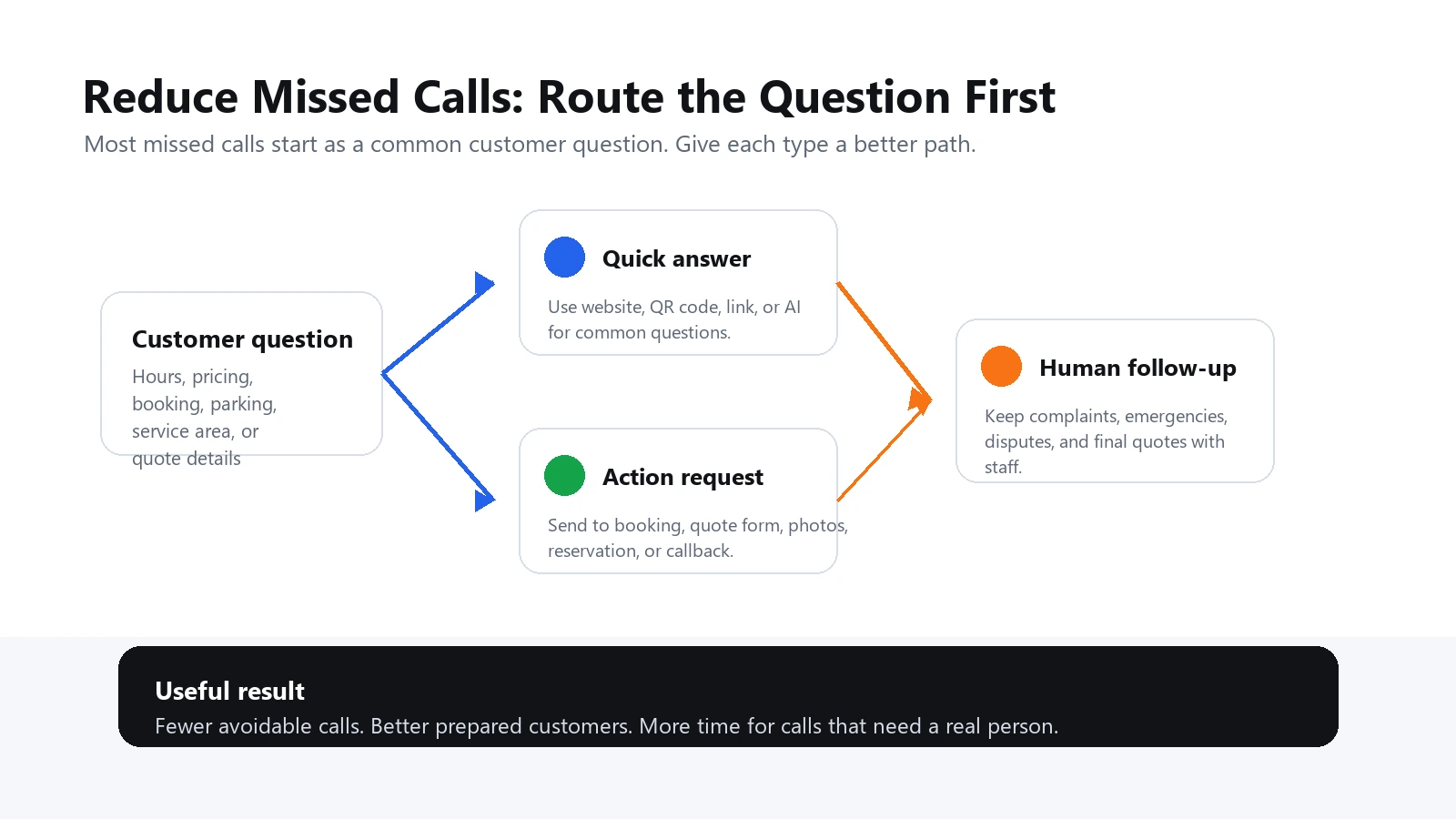
The quick answer
Reduce missed calls in this order: correct inaccurate public information, publish answers to stable repeat questions, route action requests to the right form or booking provider, state a real callback window, and reserve human time for judgment. Do not measure success as "fewer calls" alone. Measure whether customers reach the right next step with less repetition.
Run a 14-day missed-call audit before buying a solution
Start with evidence from your own business. For two weeks, record every missed call that staff can identify. Do not guess why an unknown caller rang. Add a reason only when the customer leaves a voicemail, sends a follow-up message, calls again, or explains the purpose later.
Use these fields:
- Date and local time: shows whether misses cluster during jobs, breaks, rush periods, or after hours.
- Source: Google Business Profile, website, sign, vehicle, flyer, referral, existing customer, or unknown.
- Customer wording: the actual question, not an internal category.
- Call class: stable information, action request, human judgment, or unknown.
- Urgency: today, this week, flexible, or unclear.
- What happened next: voicemail, repeat call, form, booking, message, callback, resolved elsewhere, or unknown.
- Preventable: yes only when a clear, current answer in the right place could have resolved the call.
- Owner: the person responsible for fixing the information or returning the call.
A useful log separates facts from assumptions. "No voicemail" is a fact. "Lost customer" is not, unless you have evidence. That distinction prevents a phone vendor's promise from becoming your measurement plan.
At the end of 14 days, group themes rather than individual callers. If several people ask "Do you come to my ZIP code?", "Is my neighborhood covered?", and "How far out do you travel?", treat them as one service-area information gap.
Start by Sorting Calls Into Three Groups
Before you add tools or change your phone process, sort your calls by type. This helps you decide what should be answered before the phone rings and what should still go to a person.
1. Simple Information Calls
These are the calls customers make because they cannot find a quick answer.
Examples:
- Hours
- Location
- Parking
- Service area
- Basic pricing approach
- Booking steps
- Menu or service details
- What to bring
- Return or cancellation policy
These are good candidates for self-service answers, QR code support, website updates, Google Business Profile updates, and AI-assisted customer answers.
2. Action Calls
These calls are not only questions. The customer wants to do something.
Examples:
- Book an appointment
- Request a quote
- Reserve a table
- Ask for same-day service
- Check product availability
- Reschedule
- Send photos before a repair estimate
These calls need a clear next step. Sometimes that is a booking link. Sometimes it is a form. Sometimes it is a message that says, "Send photos here and we will review them during business hours."
3. Human Judgment Calls
These calls should usually stay human.
Examples:
- Complaints
- Refund disputes
- Emergencies
- Regulated or safety-sensitive questions
- Highly specific estimates
- Emotional or unusual situations
Automation should protect human time, not pretend every issue can be handled automatically.
Build a Call-Reduction System
Once you know which calls are repetitive, you can design a simple system around them.
Step 1: Write Down Your Top 20 Phone Questions
Do not start by writing a polished FAQ. Start by collecting the real questions.
Ask yourself and your team:
- What do people call about every week?
- What calls interrupt service the most?
- What questions do people ask before they book?
- What do people ask after seeing a flyer, sign, menu, card, or social profile?
- What questions do callers ask even though the answer exists somewhere online?
- What questions come after hours?
Use the customer's wording. If customers say, "Can I just walk in?" do not turn that into "appointment policy" too soon. The customer's language is what your answer system needs to understand.
Step 2: Make the Most-Called Answers Easy to Find
If customers call because information is hidden or inconsistent, fix the public source before adding another response tool. The same hours, service area, phone number, and next-step link should agree across the places customers already look.
Good places to update:
- Google Business Profile
- Website homepage
- Contact page
- Booking page
- Instagram bio
- Facebook page
- Restaurant menu
- Service list
- Storefront sign
- Business card
- Flyer
- Receipt
- Appointment reminder
- Product packaging
Google's current Business Profile hours guidance lets an eligible business maintain regular hours, split-day breaks, special hours, and certain service-specific hours. Its representation guidelines also require accurate business information and a precise address or service area. Check the live profile while signed out after making changes; do not assume an accepted edit is visible in every surface immediately.
For each high-frequency question, assign one controlled source. Hours may be owned in the Business Profile and website. Quote requirements may be owned in the estimate page. Return boundaries may be owned in the current policy. Staff scripts, voicemail, QR destinations, and answer pages should point back to that source instead of creating competing versions.
Offline touchpoints matter too. A customer may be standing outside after closing, holding a card, or looking at a work vehicle. A QR code can route that exact moment to service-area rules, preparation steps, current hours, or a quote-information page without forcing the customer through a generic homepage.
Step 3: Give Every Common Question a Next Step
A helpful answer should do more than provide information. It should tell the customer what to do next.
Weak answer:
We are open Monday through Friday.
Better answer:
We are open Monday through Friday from 9 a.m. to 6 p.m. If you need an appointment, you can book online or call during business hours. For same-day availability, include your preferred time when you message us.
The second answer reduces another call. It answers the question and moves the customer forward.
For each common call topic, write:
- The direct answer
- Any important condition or boundary
- The next step
- When a human should follow up
Step 4: Use Voicemail as a Routing Tool, Not a Dead End
Many small-business voicemails say some version of:
We are unavailable. Please leave a message.
That is technically fine, but it does not reduce missed calls. It gives the customer no useful path unless they are willing to wait.
Try a more helpful voicemail structure:
Thanks for calling [Business Name]. If you are calling about hours, pricing, service area, parking, booking, or what to bring, visit [short link] or scan the QR code on our card or sign for quick answers. If your question needs our team, please leave your name, number, and the best time to call back.
If you use a QR code or short link, keep it easy to say and easy to type. For printed materials, the QR code can do more of the work.
If you add missed-call text-back, treat it as a separate workflow
A manual service reply to a customer who just called is not the same operational case as an automated promotional text campaign. Before enabling automatic texts, document what triggers the message, whether consent is required, how opt-out requests are honored, who monitors replies, and how a person takes over.
The FCC treats texts as calls for relevant Telephone Consumer Protection Act rules and has clarified that revocation can be made by reasonable means for robocalls and robotexts that require consent. Review the FCC's consent-revocation order and obtain advice appropriate to your exact technology and message purpose. Do not copy a marketing text template into a missed-call workflow and assume the recent call resolves every consent question.
A conservative operational message identifies the business, explains why the person is receiving it, offers one useful route, and does not add promotional content to an opt-out confirmation. Keep the customer able to call or reach a person when the issue cannot be handled by a link.
Step 5: Put QR Codes Where Calls Start
QR codes are useful when they are placed where the question appears.
For restaurants:
- Window sign
- Menu
- Takeout bag
- Table tent
- Google Business Profile link
For salons:
- Business card
- Window decal
- Appointment reminder
- Service menu
- Instagram bio
For home service businesses:
- Truck decal
- Door hanger
- Estimate sheet
- Invoice
- Yard sign
- Business card
For retail shops:
- Product display
- Shelf sign
- Receipt
- Packaging insert
- Fitting room sign
The QR code should not just say "Scan me." Use a clear promise:
- "Questions before you call? Scan here."
- "Need hours, pricing, or booking info?"
- "Ask about service area and availability."
- "Scan for product help."
Practical Example: A Home Repair Business
Imagine a small home repair business with one owner and two technicians. The phone rings throughout the day, but the team is usually driving, working inside homes, or talking to current customers.
Most missed calls are not emergencies. They are questions like:
- Do you serve my ZIP code?
- Can you come today?
- Do you fix this brand?
- How do estimates work?
- Should I send photos?
- Is there a trip fee?
- What hours do you answer calls?
The owner notices that many callers do not leave voicemail. So instead of trying to answer every call live, the business builds a simple call-reduction system.
First, they write clear answers to the top questions. Second, they add a QR code to business cards, invoices, and truck decals with the line, "Have a question before you call? Scan here." Third, they update voicemail to point people to the same link for common questions. Fourth, they add a short form for customers who want an estimate and need to upload photos.
Now customers with basic questions can get answers immediately. Customers with specific repair needs can send better information before the owner calls back. The owner still handles final estimates and unusual situations personally, but fewer calls are wasted on repeating the same basic details.
That is a better phone system without adding a new staff member.
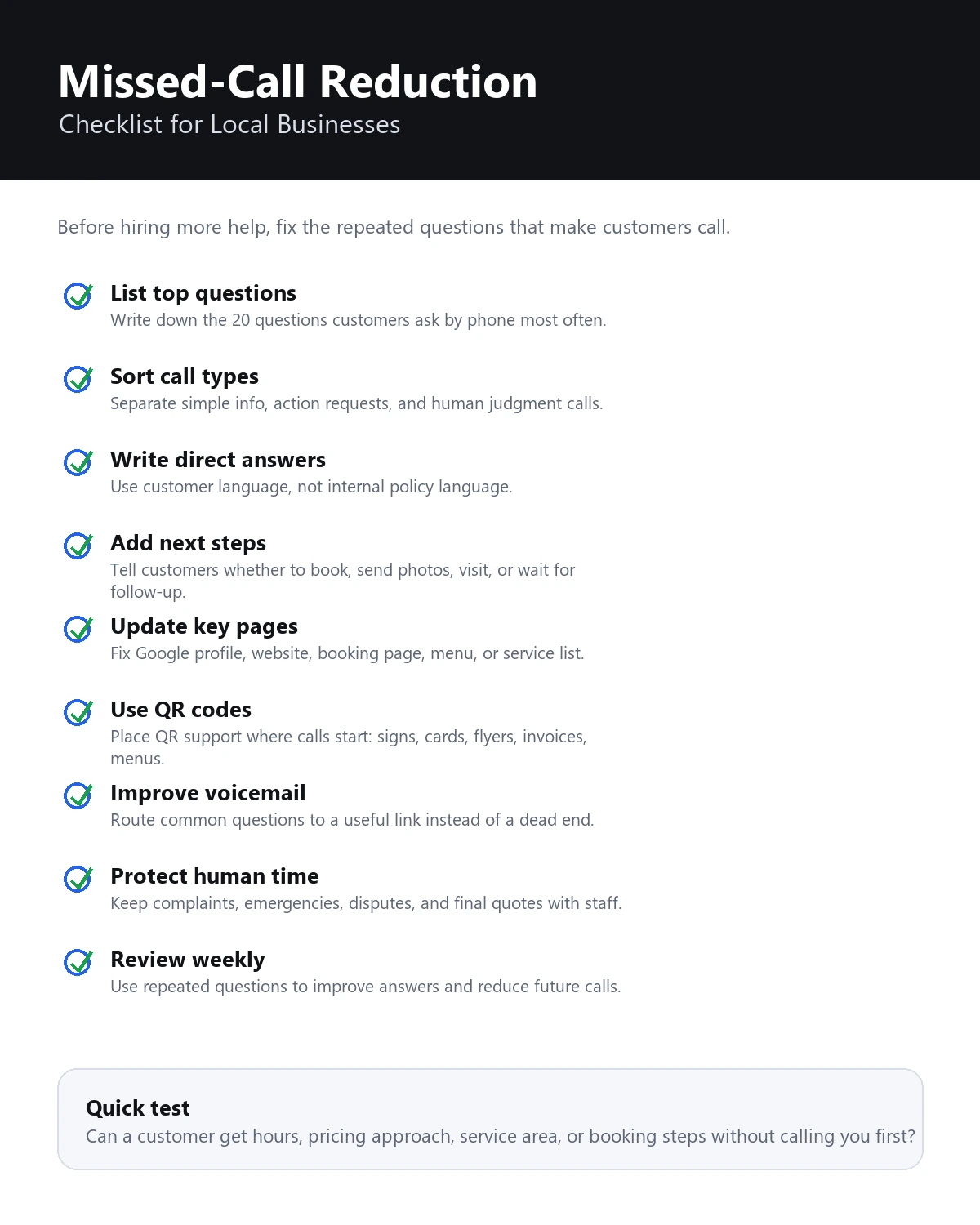
Missed-Call Reduction Checklist
Use this checklist before you spend money on more staff or another phone tool.
- List your top 20 repeated phone questions.
- Mark which questions are simple information calls.
- Mark which questions are action calls, such as booking or quote requests.
- Mark which questions require human judgment.
- Write direct answers in plain customer language.
- Add a next step to every answer.
- Update your Google Business Profile with hours, services, and important details.
- Add the same answers to your website or booking page.
- Put QR codes on the physical materials that trigger questions.
- Rewrite voicemail so it routes common questions to a useful link.
- Test the full experience on a phone.
- Ask a customer or friend to find an answer without calling.
- Review new questions weekly and improve the answers.
What Not to Automate
Reducing missed calls should not mean hiding from customers.
Keep these situations human:
- Angry customers
- Refund or billing disputes
- Regulated or safety-sensitive questions
- Emergencies
- Highly specific quotes
- Anything that could create liability if answered too generally
For those cases, the best automated answer is often a boundary:
This needs a team member to review. Please leave your contact information, and we will follow up during business hours.
Clear boundaries build more trust than overconfident answers.
How to Know If Your System Is Working
You do not need advanced reporting to start. Look for practical signals.
Track:
- Fewer repeated basic calls
- More customers using booking or quote links
- More complete voicemail messages
- More useful estimate requests
- Common questions shifting over time
- New questions from QR codes, flyers, menus, or signs
- Questions asked after hours
- Questions in languages your team does not speak fluently
If people keep asking the same question, do not blame the customer. Improve the answer, move it closer to where the question starts, or make the next step clearer.
Missed calls are feedback. They tell you where customer uncertainty is still too high.
A two-week implementation plan
Use the first week to observe and the second to change one route at a time.
- Days 1-7: log identifiable missed calls without changing the workflow, except to correct dangerous or clearly inaccurate information.
- Day 8: group the calls into stable information, action request, human judgment, and unknown.
- Day 9: correct hours, service area, phone, website, and action links in the Business Profile and website.
- Day 10: write direct answers to the five most repeated stable questions. Give each answer an owner and source.
- Day 11: rewrite voicemail with the real callback window, a short answer route, and the details staff need in a message.
- Day 12: add one matched QR or short-link destination where a repeated question begins.
- Day 13: test every route on a phone while signed out. Check links, forms, voicemail wording, business hours, and human escalation.
- Day 14: review the new call log. Look for fewer repeated basic questions, better voicemail detail, and clearer action requests, not merely a lower total call count.
Keep the changes that resolve a documented question. Rework or remove a route that creates another step without helping the customer decide what to do.
Official sources and review notes
- Google Business Profile Help: Edit your business hours
- Google Business Profile Help: Get started with Business Profile
- Google Business Profile Help: Guidelines for representing your business
- Federal Communications Commission: Consent revocation for robocalls and robotexts
- Federal Trade Commission: Protecting Personal Information, A Guide for Business
Sources and platform guidance were checked on August 10, 2026. This article does not provide legal advice. Rules for calls and texts depend on message purpose, technology, consent, recipient, and jurisdiction.
A good missed-call system does not hide the phone number. It helps simple questions resolve faster and gives important calls a clearer path back to a person.
Last updated
Last updated: August 10, 2026. The URL, canonical, original publication date, and index status are unchanged. Google Business Profile and FCC references were rechecked for this revision.
FAQ
What is the best way to reduce missed calls for a local business?
Start by identifying the questions customers call about most often. Then make those answers easier to find through your website, Google Business Profile, voicemail, QR codes, and customer-facing links. Keep complex or sensitive calls for a person.
Should a small business use voicemail or automation?
Both can work together. Voicemail is useful for personal follow-up, but it should not be a dead end. A voicemail can route customers to quick answers while still letting them leave a message for staff.
Can QR codes reduce phone calls?
Yes, when the QR code leads to useful answers. QR codes work best on signs, menus, cards, flyers, invoices, product packaging, and other places where customers naturally have questions.
What calls should not be automated?
Do not automate emergencies, complaints, refund disputes, sensitive advice, or final quotes that require professional judgment. Use automation for common questions and clear next steps.
How can RealLink AI help with missed calls?
RealLink AI provides a public AI answer page reached through a QR code or link. It answers from business-provided information and can surface recurring question themes. It does not answer phone calls or confirm live bookings, stock, or availability.