
QR code customer service
QR Code Customer Service for Small Businesses
How to turn menus, signs, cards, flyers, and packaging into places customers can actually ask questions.
A customer scans your QR code because they need something. They may be looking at your menu, standing outside your store after closing, holding your business card, reading a flyer, or opening a product package.
Then the QR code sends them to a static page that still does not answer their question. They pinch and zoom. They hunt through a PDF. They tap around a homepage. If the answer is not obvious, the scan becomes another dead end.
That is the problem with many small-business QR codes. The code works technically, but it does not create a useful customer service moment.
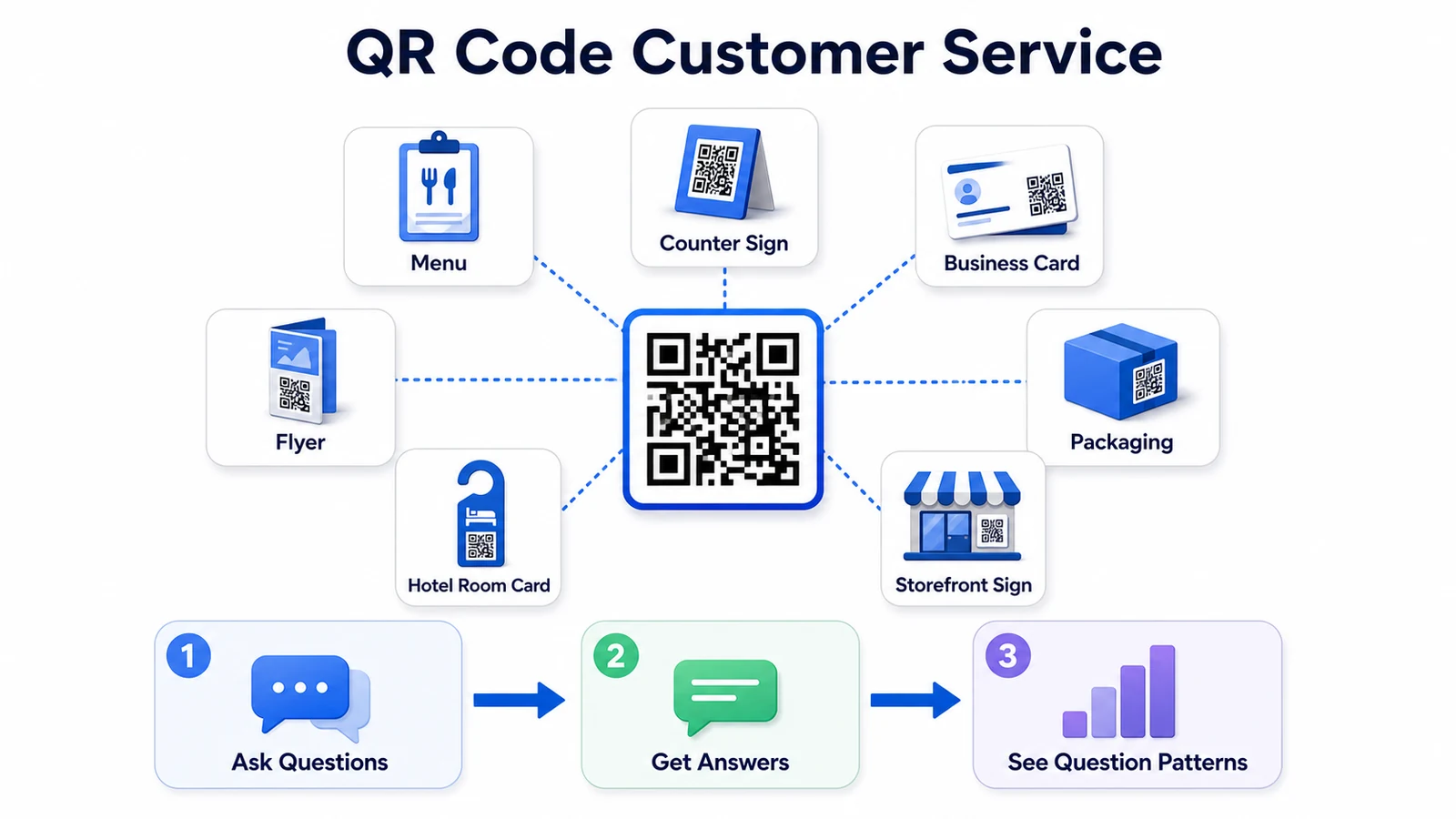
QR code customer service is different. Instead of treating a QR code as a shortcut to a menu or homepage, you treat it as a customer entry point. The scan should help someone ask a real question, get a helpful answer, and know what to do next.
This guide shows how small businesses can use QR codes for practical customer support, not just digital menus.
Why Most QR Codes Become Dead Ends
A QR code is only as useful as the experience behind it. Customers do not scan because they admire the code. They scan because they want something faster than typing, searching, calling, or waiting.
Small businesses often use QR codes in ways that are technically correct but operationally weak:
- A restaurant menu QR code opens a long PDF, but guests still cannot ask about allergens, reservations, parking, or group seating.
- A business card QR code opens the homepage, but the prospect still does not know pricing, service area, or what to prepare before calling.
- A flyer QR code opens a promotion page, but the interested customer cannot ask whether the offer applies to their situation.
- A product package QR code opens a brand page, but the customer needs setup, care, warranty, or troubleshooting help.
- A hotel room card QR code opens a generic website, but the guest needs Wi-Fi, parking, late checkout, breakfast, or local recommendations.
The scan creates interest, but the destination does not finish the job.
For customer service, the better question is not "Where should this QR code go?" The better question is "What question will the customer have at this exact moment?"
What QR Code Customer Service Actually Means
QR code customer service means using a QR code to help customers get answers from a physical or local touchpoint. It is not only about sending traffic to a website. It is about reducing uncertainty where the customer already is.
A strong QR customer service flow usually does four things:
- It tells customers what the scan is for.
- It answers common questions in plain language.
- It gives a clear next step.
- It helps the business learn what customers keep asking.
For a small business, that can be more valuable than another static link. A QR code can help with after-hours customer service, reduce repeated questions, support multilingual customers, and lower avoidable calls during busy periods.
The important part is that the QR code should match the context. A QR code on a menu should not behave exactly like a QR code on a repair invoice. A QR code on packaging should not behave exactly like a QR code on a salon business card.
Where QR Codes Can Answer Real Customer Questions
Start with the places where customers already pause, wonder, compare, or hesitate.
Menus and Table Tents
Restaurants, cafes, bakeries, food trucks, and bars can use QR codes for more than menu access. Guests may want to know about allergens, substitutions, reservations, wait times, parking, takeout, catering, private events, or whether a patio is open.
A useful scan promise might be: "Questions about ingredients, hours, or reservations? Scan to ask."
Storefront Signs
Storefront QR codes are especially useful after closing. A customer standing outside may want to know tomorrow's hours, appointment rules, service area, pricing approach, or whether a product is available.
A useful scan promise might be: "Closed right now? Scan to ask common questions."
Business Cards
A business card creates a short window of attention. If the customer waits until later, the moment may fade. A QR code can let prospects ask about services, pricing approach, availability, examples of work, service area, or how to book.
For solopreneurs, consultants, stylists, home service providers, and local professionals, this can turn a card into a practical pre-sales tool.
Flyers and Brochures
Flyers often create awareness but fail to answer the exact question that would make someone act. A QR code can let a customer ask, "Does this apply to my neighborhood?" "Can I use this on weekends?" or "What is included?"
This matters because print marketing usually has limited space. The QR code can carry the conversation that does not fit on the paper. For a fuller print-marketing workflow, read the guide to QR codes on flyers and brochures.
Packaging, Manuals, and Product Inserts
Product-based businesses can use QR codes for setup, care, warranty, ingredients, sizing, troubleshooting, returns, and multilingual support. This is especially useful when customers lose the manual or need help while using the product.
The QR code should not only say "Visit our website." It should make support easy at the moment the product question appears.
Hotel Room Cards and Guest Materials
Hotels, short-term rentals, tour operators, and local hospitality businesses can use QR codes to answer guest questions without making every question a front-desk call. Guests may ask about Wi-Fi, parking, breakfast, checkout, nearby food, local transportation, accessibility, or house rules.
Multilingual answers are especially useful here because travelers may be more comfortable asking in their own language.
Build a Question-First QR Code Flow
A good QR code flow is built around questions, not pages. Here is a simple structure small businesses can use.
1. Write the Scan Promise
The text next to the QR code should tell customers why scanning is worth it. "Scan me" is vague. "Scan to ask about hours, pricing, and booking" is useful.
Better scan promises include:
- "Questions before you call? Scan here."
- "Ask about hours, parking, reservations, and menu details."
- "Need product help? Scan for setup and care answers."
- "Closed right now? Scan to ask common questions."
- "Ask in your language."
2. Prepare Answers for the Moment
Do not start by copying your whole website. Start with the questions customers are likely to have at that touchpoint.
For a menu, prepare answers about ingredients, substitutions, takeout, reservations, and kitchen hours. For a business card, prepare answers about services, pricing approach, service area, and booking. For packaging, prepare answers about setup, safety, care, warranty, and troubleshooting.
3. Add the Next Step
A helpful answer should tell the customer what to do next. That might be book online, call during business hours, send photos, visit the store, bring a document, choose a pickup time, or leave contact information.
Without a next step, the QR code may answer the question but still fail to move the customer forward.
4. Review the Questions People Ask
This is where QR code customer service becomes more than support. The questions customers ask can reveal missing information, confusing policies, product friction, language demand, pricing concerns, and buying hesitation.
If 30 people scan a flyer and ask whether a service is available in their ZIP code, your flyer needs clearer service-area copy. If hotel guests keep asking about parking, your arrival instructions need work. If customers scan a menu and ask about allergens, your menu labels may need improvement.
QR Code Customer Service Checklist
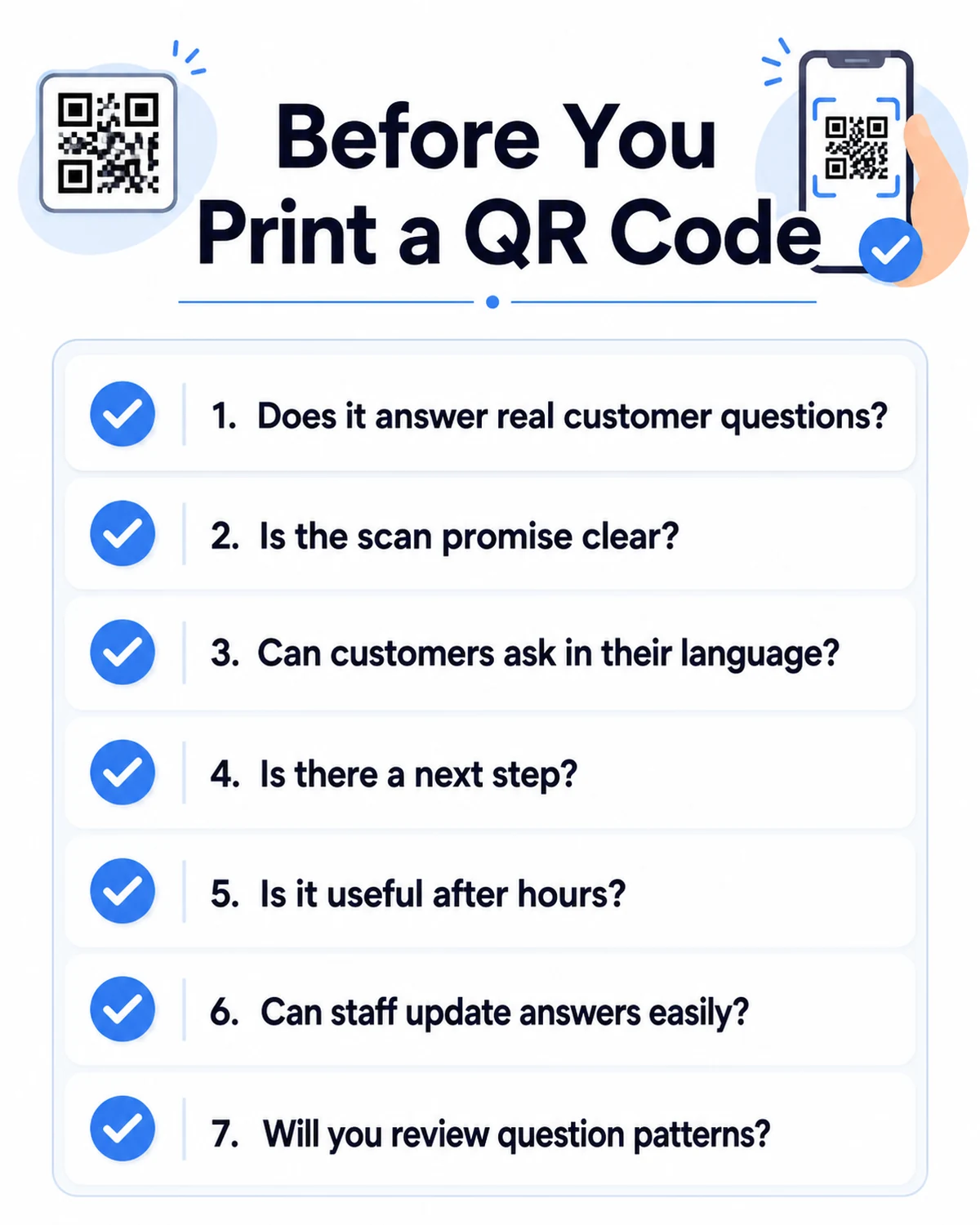
Before you print or publish a QR code, run through this checklist.
- Can you name the customer question this QR code is meant to answer?
- Does the text near the QR code clearly explain the benefit of scanning?
- Is the destination easy to use on a phone?
- Can customers ask follow-up questions instead of only reading a static page?
- Does the answer include a next step?
- Can customers ask in their language if your business serves multilingual customers?
- Are there clear boundaries for emergencies, complaints, disputes, or sensitive advice?
- Can staff update answers when hours, pricing, services, or policies change?
- Will you review the questions customers ask?
- Did you test the QR code from a real phone before printing?
Practical Example: A Neighborhood Cafe
Imagine a neighborhood cafe that already has a QR code on its counter sign and takeout bags. The QR code opens the menu. That helps some customers, but staff still answer the same questions every day:
- Do you have dairy-free milk?
- Which pastries are gluten-free?
- Can I order ahead?
- Do you take catering orders?
- Is there parking nearby?
- Can I bring a laptop?
- Are dogs allowed on the patio?
- What time do you stop serving breakfast?
The cafe does not need a complicated support department. It needs a better QR destination.
The owner changes the counter sign from "Scan for menu" to "Questions about menu, ingredients, hours, or catering? Scan to ask." The same QR code appears on takeout bags and a small window sign for after-hours customers.
Now a customer can ask, "Do you have oat milk?" or "Can I order pastries for tomorrow morning?" The answer can explain what the cafe knows, offer the next step, and route anything specific to staff. If the customer asks in Spanish or Korean, the answer can still be based on the same approved cafe information.
After a week, the owner reviews the question patterns. Many people ask about gluten-free items, so the cafe updates the menu labels. Several people ask about catering, so the owner adds a clearer catering next step. People keep asking whether laptops are welcome, so the cafe adds a simple policy to the counter sign and website.
The QR code did not just reduce questions. It showed the owner what customers needed to know before buying.
What Not to Put Behind a QR Code
A QR code can make customer service easier, but it can also create frustration if the destination is lazy or risky.
Avoid these common mistakes:
- Sending every scan to a generic homepage.
- Opening a large PDF that is hard to read on a phone.
- Using "Scan me" with no explanation.
- Forcing customers to download an app for basic answers.
- Hiding contact information when a human is needed.
- Letting outdated hours, pricing, menus, or policies stay live.
- Answering sensitive medical, legal, financial, safety, or dispute questions without a clear human handoff.
Good QR code customer service should feel like help, not a maze.
How to Measure Whether QR Code Customer Service Is Working
You do not need enterprise analytics to start. Track a few practical signals.
- Which QR placements generate the most questions?
- Which questions are repeated?
- Which questions happen after hours?
- Which questions show buying hesitation?
- Which languages do customers use?
- Which answers need clearer next steps?
- Which questions still require staff follow-up?
This turns a QR code into a feedback channel. Instead of guessing what customers need, you can see the questions they ask from menus, cards, signs, flyers, packages, and local touchpoints.
That also supports other improvements. If QR questions show that customers are calling about the same topics, your QR code customer service can work together with a missed-call reduction system.
A One-Week Plan to Improve Your QR Codes
Use this simple plan before printing a new batch of menus, cards, flyers, or packaging.
- Day 1: List your physical touchpoints, such as menu, sign, card, flyer, packaging, receipt, or room card.
- Day 2: Write the top customer questions for each touchpoint.
- Day 3: Choose one touchpoint with the most repeated questions.
- Day 4: Write a clear scan promise for that QR code.
- Day 5: Prepare answers and next steps for the top 10 questions.
- Day 6: Test the QR code on multiple phones and ask one person outside the business to try it.
- Day 7: Publish it, then review the first questions customers ask.
Start with one QR code. Make it useful. Then expand to the next touchpoint.
A QR code should not be a decoration or a shortcut to a dead page. Used well, it can become one of the simplest customer service tools a small business has.
FAQ
What is QR code customer service?
QR code customer service uses a QR code to help customers ask questions, find answers, and take the next step from a physical touchpoint such as a menu, sign, flyer, business card, product package, or hotel room card.
What should a small business QR code link to?
It should link to the most useful next step for that touchpoint. That might be a question-and-answer experience, booking page, service guide, product support page, or customer support flow. A generic homepage is often less helpful.
Can QR codes reduce customer phone calls?
Yes, if the QR code answers the questions that usually trigger calls, such as hours, pricing approach, service area, menu details, booking steps, parking, availability, or product support.
Where should local businesses place QR codes?
Good placements include menus, table tents, storefront signs, business cards, flyers, receipts, packaging, manuals, hotel room cards, appointment cards, invoices, and any place where customers naturally have follow-up questions.
How can RealLink AI help with QR code customer service?
RealLink AI lets small businesses place an AI employee behind a QR code or link. Customers can ask questions in their own language, get answers based on the business information you provide, and help the owner review question patterns over time.