
Small business operations
Customer Service Automation for Small Businesses
A practical way to decide what to automate, control the source information, and keep judgement calls with people.
Customer service automation should remove a predictable step, not hide an unpredictable problem. For a small business, the best first project is rarely “install a bot everywhere”. It is one narrow workflow with a stable answer, a visible next step, and a named person responsible when the automation reaches its limit.
This guide gives you a scoring method for choosing that workflow, a source-of-truth worksheet, human handoff rules, and a 30-day rollout. It applies to manufacturers, trades, retailers, exporters, hospitality businesses, consultants, and general service companies. Sensitive or regulated decisions need their own specialist process.
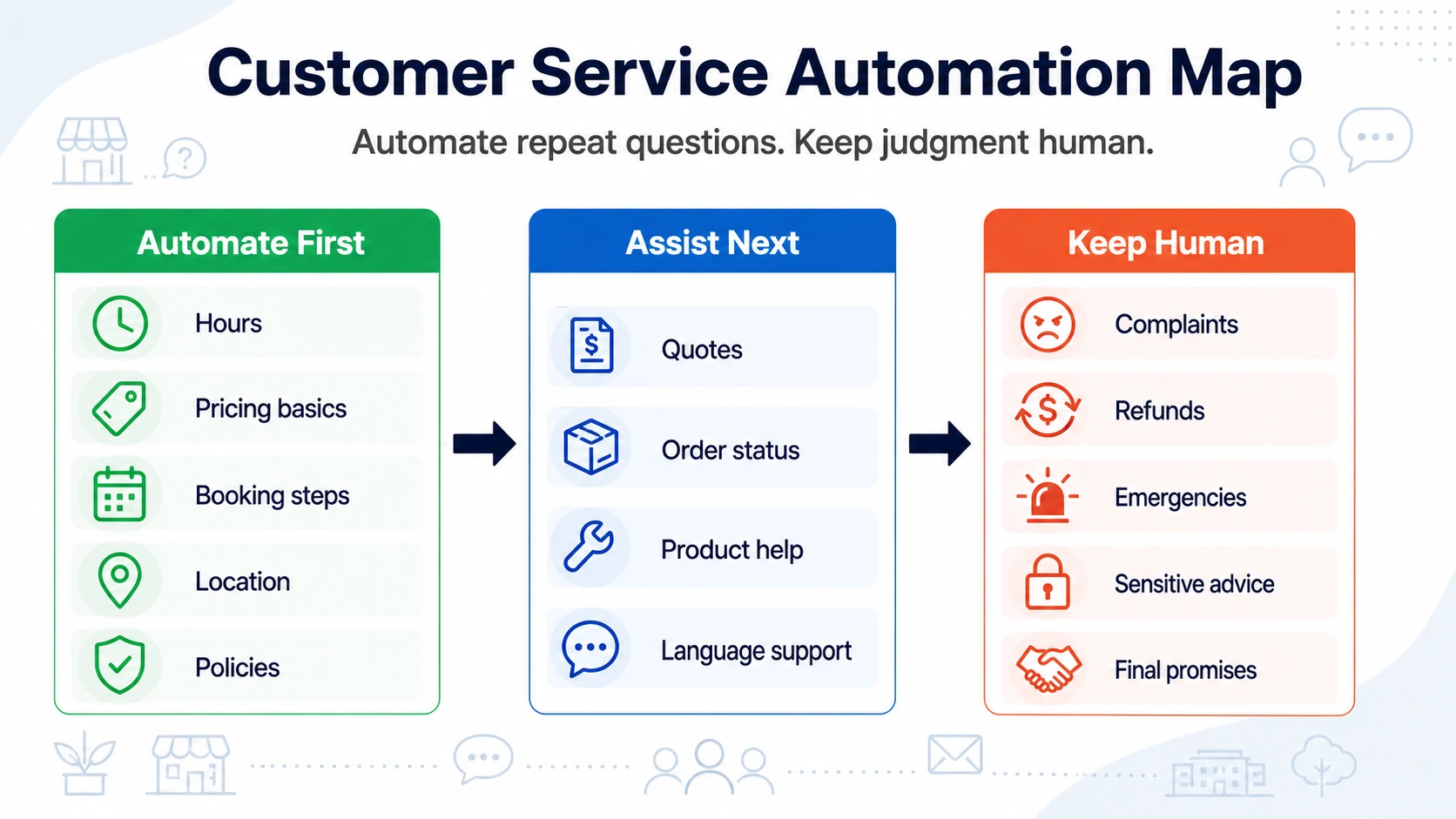
The Short Answer: Automate Facts, Assist Processes, Keep Decisions Human
Sort every customer-service task into one of three levels:
- Automate: publish an approved answer that stays true for most customers, such as location, service area, preparation steps, ordinary lead times, or a documented policy.
- Assist: explain the process and what information to prepare, but do not claim the job is complete. Quote requests, order enquiries, and troubleshooting often belong here.
- Human: send the customer to an authorised person for complaints, refunds, payment disputes, safety issues, exceptions, final prices, and sensitive advice.
This distinction prevents the most common failure: a tool gives a confident general answer to a question that depends on current inventory, a private account, an inspection, or staff judgement.
Score a Task Before You Automate It
Frequency alone is not enough. A question can be common and still be dangerous to automate. Give each candidate task a score from zero to two on four factors.
- Frequency: 0 for rare, 1 for occasional, 2 for repeated every week.
- Answer stability: 0 if it changes by customer or day, 1 if it changes on a schedule, 2 if it is normally fixed.
- Consequence of error: 0 if a wrong answer could affect safety, rights, money, or a major commitment; 1 if it causes recoverable inconvenience; 2 if correction is simple and low-risk.
- Dependence on live data: 0 if it needs a private account, current inventory, or real-time booking state; 1 if staff update it manually; 2 if approved static information is enough.
Tasks scoring seven or eight are strong first candidates. Scores of four to six usually suit an assisted workflow. Anything below four should stay human until the process or data source changes.
Examples:
- “Which suburbs do you service?” may score 8 when the service area is documented.
- “Do you have this part in stock right now?” may score 3 without a live inventory connection.
- “What will my installation cost?” may score 2 when price depends on a site inspection.
- “What should I prepare before the technician arrives?” may score 7 when the checklist is approved and stable.
Build the Source-of-Truth Worksheet
Automation quality is limited by the information behind it. Before choosing a platform, make a simple worksheet with one row per answer.
- Customer wording: the question as customers actually ask it.
- Approved answer: a short answer that can be published without extra interpretation.
- Owner: the person authorised to change it.
- Source: policy, product sheet, service map, price list, or operating procedure.
- Expiry trigger: holiday, price change, new product, staff change, or contract update.
- Boundary: what the answer does not confirm.
- Next step: the link, phone number, form, or business-hours contact customers should use.
For example, “We serve the Denver metro area” is incomplete if the real rule excludes mountain addresses or jobs beyond 30 miles. A stronger approved answer states the ordinary area, names the exception, and asks the customer to confirm the address with staff before making plans.
Keep public channels consistent. Google says verified businesses can edit hours, service areas, contact details, links, and other information to keep their Business Profile accurate and current. Use its current Business Profile editing guidance when that profile is one of your sources.
Choose the First Workflow by Customer Moment
Before a customer contacts you
Answer purchase-friction questions: what the business does, who it serves, service area, preparation, starting process, ordinary timing, and where a final quote comes from. The goal is not to close every sale automatically. It is to help a suitable customer take the correct next step.
While your team is busy
Offer an immediate route for repeated questions without pretending a person is available. A website link, public answer page, QR code on a sign, or voicemail instruction can explain basics and tell the customer when staff will respond. See the separate after-hours customer service guide for coverage outside staffed periods.
Before an appointment or delivery
Use reminders and approved preparation instructions. Include what to bring, access requirements, parking, cancellation rules, and whom to contact when circumstances change. Do not show a live slot or delivery status unless the system actually has that data.
After a purchase
Answer setup, care, ordinary warranty-process, document, and support-channel questions. Keep fault assessment, remedy decisions, refunds, and disputes with authorised staff.
Design the Failure and Human-Handoff Rules
A useful automation project includes the failure path before launch. Write what happens when:
- the requested information is not in the approved source;
- two sources conflict;
- the customer asks about a live order, booking, or account;
- the question involves safety, a complaint, payment, or a legal right;
- the customer says the answer is wrong;
- the primary contact is away;
- the tool or destination is unavailable.
The fallback message should be specific. “Contact us” is weaker than “Our answer page cannot confirm live stock. Call the parts desk on weekdays from 8 a.m. to 4 p.m. and quote the part number.”
NIST's AI Risk Management Framework recommends documenting an AI system's task, knowledge limits, human oversight, testing, and ongoing review. A small business does not need an enterprise governance department to use that logic. One page naming the scope, owner, limits, test cases, and incident response is a strong start. See the official NIST AI RMF Core.
Worked Example: A Small Equipment Installer
A five-person commercial equipment installer loses time to the same questions: service area, site access, electrical requirements, expected installation duration, warranty documents, and whether a technician can quote from photos.
The owner scores the tasks. Service area, preparation, and document questions score highly. Exact prices, current technician availability, fault diagnosis, and final warranty decisions score poorly because they depend on inspection or current records.
The first workflow therefore does four things:
- answers approved service-area and preparation questions;
- explains which photos and measurements help staff review a request;
- links to product setup and care documents;
- states that final quotes, booking confirmation, fault diagnosis, and remedies come from staff.
The business places the same help link on its website, quote cover sheet, equipment handover card, and voicemail. It does not connect the workflow to private customer records. One operations manager owns the answers and reviews new question patterns every Friday during the pilot.
This is customer service automation, even though it does not replace the phone or make decisions. It removes predictable information work and protects staff time for the variable work customers are paying for.
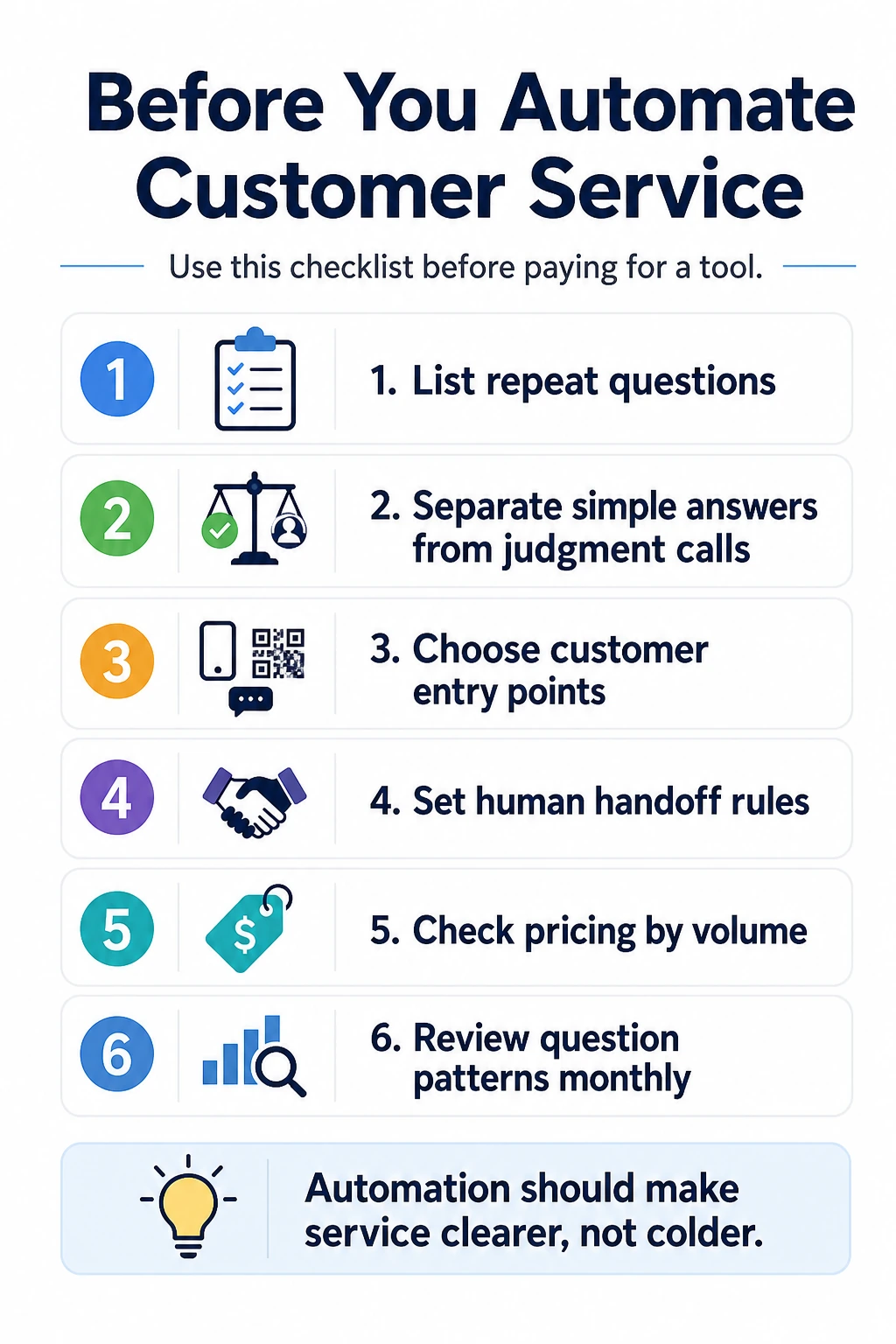
A 30-Day Rollout That Does Not Overbuild
Days 1-5: Observe
Collect real questions from calls, email, messages, forms, staff notes, and walk-ins. Combine wording variants, but keep different intentions separate. “What do you charge?” and “Can you send a final quote?” are not always the same task.
Days 6-10: Score and approve
Score each task, select one high-scoring workflow, and write 10 to 20 approved answers. Add the source, owner, boundary, and next step. Review every answer with the person who handles exceptions.
Days 11-15: Test
Use real and adversarial questions. Ask for a final price, an exception, a live order status, a refund, and an answer that is absent from the source. Check that the experience admits its limits and provides the right human path.
Days 16-23: Pilot one entry point
Launch on the highest-value entry point, such as the contact page, storefront sign, packaging insert, or voicemail. Do not add it everywhere until you know customers understand the label and destination.
Days 24-30: Review and decide
Review the questions, answer corrections, unresolved topics, staff interruptions, and completed next steps. Expand only when the workflow is accurate and the owner can maintain it.
Measure Outcomes, Not Just Conversations
A conversation count does not tell you whether automation helped. Keep a small scorecard:
- questions answered from an approved source;
- questions that needed correction;
- questions the workflow correctly declined;
- customers who reached the intended next step;
- repeat phone or email questions on the same topic;
- new topics that reveal a missing website, sign, product, or policy explanation;
- time spent reviewing and maintaining answers.
Question patterns are useful beyond support. If customers repeatedly ask whether a part fits, the product page may need a compatibility table. If they ask where you operate, the service-area page may be too vague. Fixing the source can be more valuable than adding another automated reply.
Evaluate Software Against the Workflow
Once the work is defined, compare tools using operational questions:
- Can we control and update the source information?
- Can the experience state limits instead of inventing an answer?
- Can customers reach it at the website, QR, link, or other entry point we need?
- Can we see what customers ask and which answers need work?
- What customer data is collected, where is it handled, and who can access it?
- What happens when the service is unavailable?
- What is the full cost at our expected request volume?
- Can we export or retain the source content if we change providers?
For a pricing-focused comparison, use the separate affordable customer service automation checklist. If the main problem is missed calls, also compare the options in answering service alternatives for small businesses.
Good customer service automation is deliberately limited. When the scope, source, owner, fallback, and measurement are clear, a small business can make common answers easier to reach without automating the moments that require responsibility.
FAQ
What should a small business automate first in customer service?
Start with frequent questions whose answers are stable, low-consequence, and independent of live customer or order data. Hours, location, service area, preparation steps, and published policies are common candidates.
What customer service tasks should not be automated?
Keep complaints, emergencies, refunds, payment disputes, sensitive advice, custom quotes, and final promises with an authorised person. Automation can explain the contact path but should not present a judgement call as a completed decision.
Is customer service automation worth it for a very small business?
It can be worthwhile when repeated questions interrupt paid work or slow customer decisions. Test one narrow workflow for 30 days and compare answer corrections, unresolved questions, staff interruptions, and completed next steps before expanding.
How do I choose customer service automation software?
Choose based on the jobs you have approved for automation, how source information is updated, what happens when an answer is uncertain, the customer entry points you need, reporting, privacy, and the full cost at your expected volume.
How can RealLink AI help with customer service automation?
RealLink AI provides a public AI answer page reached through a QR code or link. It answers from business-supplied information and shows question patterns. It is not a phone answering service, booking engine, live inventory system, or final decision-maker.