
Coverage outside staffed hours
After-Hours Customer Service for Small Businesses
Build an honest coverage plan for immediate answers, next-business-day follow-up, and genuinely urgent issues.
After-hours customer service is not the same as being open 24/7. It is a coverage plan: what customers can solve now, what your team will handle next, and what rare issue should reach an authorised on-call person.
A useful plan makes three things visible before the customer sends a message: whether anyone is monitoring the channel, when the next response will happen, and what to do if the issue cannot wait. That clarity is often more useful than an automatic reply that sounds friendly but creates no next step.
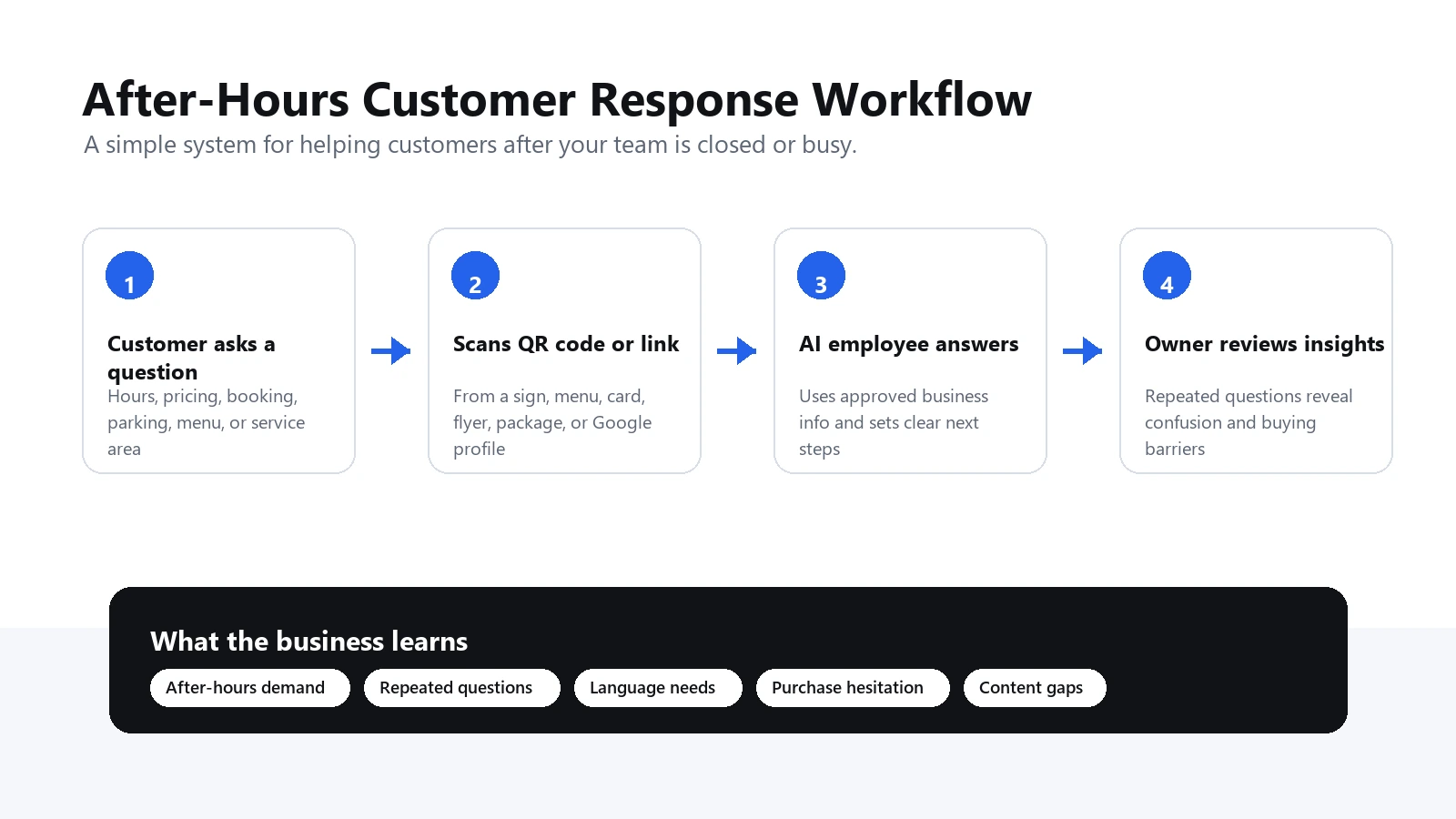
Start With Three After-Hours Tiers
Tier 1: Self-service now
Use approved information for stable, low-risk questions: regular and holiday hours, location, service area, parking, preparation steps, ordinary ordering or booking process, published policies, product care, and the correct daytime contact.
Tier 2: Record for the next business period
Use a monitored inbox, form, voicemail, or message queue for questions that need customer-specific review: quotes, booking changes, live order status, technical problems, returns, invoices, complaints, and accessibility requests. Confirm receipt and state when a person will review it.
Tier 3: Authorised urgent route
Reserve this for categories your business has explicitly defined, such as a safety issue at an active job site or a critical failure under a support contract. Name the on-call owner, required details, response expectation, and fallback. If your business is not an emergency service, say so and direct immediate danger to the appropriate local emergency channel.
Build a Channel Coverage Matrix
Customers do not experience your channels separately. They may see closed hours on Google, call the number, read the voicemail, open the website, and then message a social account. Contradictory promises create repeat contact.
Create one row for every entry point:
- Channel: phone, website, email, form, text, social message, Google profile, storefront, packaging, invoice, or handover sheet.
- Monitored when: exact days, hours, and time zone.
- Immediate help: the stable information available without staff.
- Intake: where a customer-specific request is recorded.
- Next response: a realistic business-day promise.
- Urgent route: only if the business truly provides one.
- Owner and backup: people responsible for the next action.
- Last checked: the date the hours, links, and scripts were tested.
If a social inbox is not monitored overnight, do not let its autoresponder imply live chat. If voicemail is checked at 9 a.m. on weekdays, say that instead of “we will get back to you shortly”.
Fix the Public Hours Before Adding Automation
An after-hours flow cannot compensate for outdated opening times. Check your website, Google Business Profile, social profiles, booking page, storefront sign, voicemail, and delivery or pickup pages.
Google's current guidance lets businesses set main hours, special hours for temporary changes, and more hours for particular services. It recommends confirming holiday hours even when they match regular hours. For a closure of seven or more consecutive days, Google directs businesses to use the temporarily closed setting rather than special hours. Review the official special-hours instructions before holidays or exceptional closures.
Use one person as the source owner and one checklist for every channel. Updating Google while leaving the website, voicemail, and door sign unchanged still creates a customer-service problem.
Decide What Can Be Answered Without Live Data
The safest after-hours answers are based on information that remains true without looking up a private customer record.
Usually suitable:
- where the business operates;
- ordinary hours and planned closures;
- what products or services are generally offered;
- how an estimate, booking, order, return, or support request normally works;
- what information to prepare;
- published cancellation, deposit, delivery, or warranty-process information;
- approved setup, care, and basic troubleshooting instructions;
- when staff will next review a request.
Usually unsuitable without a connected, verified system or a person:
- live inventory or appointment availability;
- current order, payment, claim, or account status;
- exact quotes or final delivery promises;
- refunds, disputes, complaints, and exceptions;
- safety-sensitive diagnosis;
- identity verification or private record disclosure;
- legal, medical, financial, or other sensitive advice.
The answer can still explain the process. “Our team confirms stock after checking the warehouse at 8 a.m.” is useful and truthful. “Yes, it is in stock” is not acceptable when the channel has no live inventory data.
Write the Four Messages Customers Actually See
Voicemail
Thanks for calling [Business]. We are closed and next review messages at 8 a.m. Mountain Time on Monday. For hours, service area, preparation, and product questions, visit [short address]. For a quote or account-specific issue, leave your name, callback number, and job or order reference. This line is not monitored for emergencies.
Email or form confirmation
We received your message. Our team reviews new requests Monday to Friday from 8 a.m. to 4 p.m. Mountain Time. We will send an update by noon on the next business day. Please do not send passwords, full payment-card details, or identity documents by email.
Storefront or printed QR label
Closed right now? Scan for hours, service area, preparation, and next steps. Staff reply during the hours printed below. For immediate danger, use the appropriate emergency service.
Social-message reply
This inbox is not monitored live. For general information, use [link]. For a request that needs staff review, email [address] and include your order or job reference. We next respond on [day/time/time zone].
Edit each message to match the real workflow. Never claim that a message has been assigned, paused, escalated, or secured unless the system actually performs that action.
Choose the Right Coverage Option
Voicemail plus next-day callback
Best when volume is low and most questions need staff judgement. Improve it with a specific callback window, the details callers should leave, and a self-service link for common facts.
Structured form or shared inbox
Best when the team needs consistent intake. Ask only for information needed to route the request. Create an owner, backup, status, and reminder; an inbox alone is not a workflow.
Public FAQ or answer page
Best for repeated questions that do not require a private record. Place the same destination where questions start: website, sign, product insert, invoice, business card, or voicemail. Keep final prices, live availability, and customer-specific decisions out of it.
Live answering service
Best when a human must answer or take structured messages outside normal hours. Before buying, define what the agent may promise, which systems they can access, escalation rules, privacy requirements, and how inaccurate messages are corrected. Compare options in the answering service alternatives guide.
On-call staff
Best only when the business has a genuine urgent obligation or high-value service agreement. Define rotation, compensation, eligible issues, acknowledgement times, and what happens if the primary person does not respond.
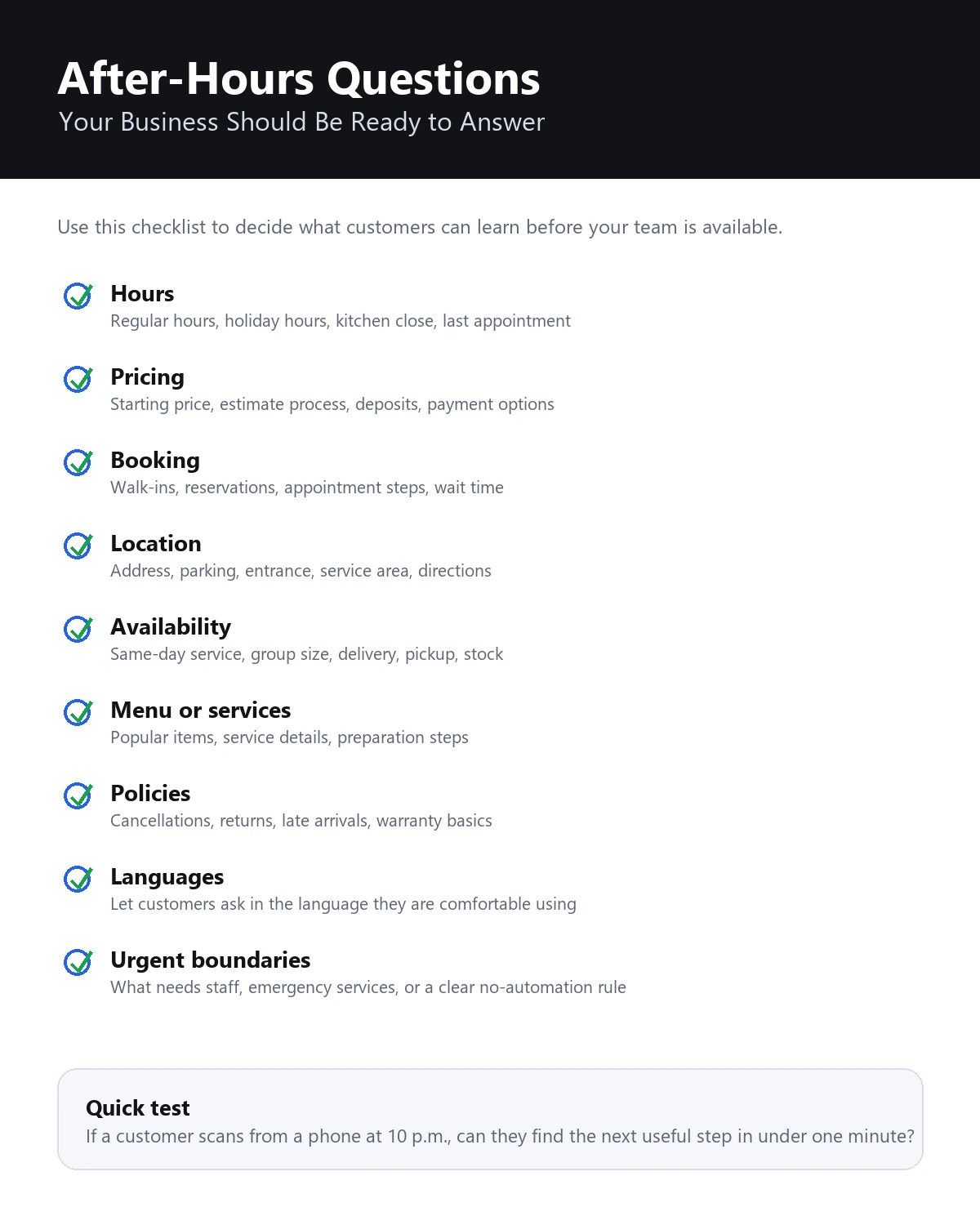
Worked Example: A Small Commercial Sign Company
A commercial sign company receives evening enquiries from property managers and contractors. Most ask whether the company serves their city, what files are needed, whether permits are included, how installation scheduling works, and how quickly someone can quote.
The company does not provide 24-hour live support. Its old voicemail says only, “Leave a message.” Social messages receive a generic instant reply, while the website claims “fast response”. Customers often submit the same request twice.
The owner builds three tiers:
- A public help destination answers service area, file formats, site-photo requirements, permit-process basics, and the ordinary quote process.
- A short form records business name, project address, sign type, target date, and preferred contact method for review at 8 a.m.
- Only active installation-site safety issues use the contract's on-call number. New quote requests do not.
The voicemail, website, proposal footer, and social reply all promise an update by noon on the next business day. The public help content states that final price, permit requirements, material availability, and installation date are confirmed by staff.
The team then reviews duplicate submissions, incomplete enquiries, missed callback targets, and the questions people ask before submitting the form. It learns that many customers do not understand which site photos are useful, so it improves the photo checklist rather than adding another message.
Control Weekends, Holidays, and Unexpected Closures
After-hours information fails most often when the schedule changes. Keep a small change-control record:
- date and reason for the change;
- last staffed period before closure;
- next staffed period, including time zone;
- Google special-hours or temporary-closure update;
- website banner or hours update;
- voicemail and auto-reply update;
- booking, pickup, delivery, and support exceptions;
- public answer or FAQ source update;
- person who tested every link and message;
- scheduled date to restore normal wording.
Write the restoration step at the same time as the closure. Otherwise a “closed for the holiday” message may survive into the next week.
Run a Seven-Day Pilot
- Day 1: list every channel and the current after-hours promise.
- Day 2: classify the last 30 after-hours questions into self-service, next-period, and urgent tiers.
- Day 3: approve 10 stable answers and write explicit boundaries.
- Day 4: rewrite voicemail, form confirmation, social reply, and one printed label.
- Day 5: test normal, uncertain, complaint, live-status, and urgent scenarios from a customer's phone.
- Day 6: launch on one or two high-value channels and assign the next-morning owner.
- Day 7: review missed promises, duplicate contact, wrong answers, unanswered topics, and customer next steps.
Keep the pilot small enough that one person can correct an answer the same day. Expand only after the coverage promise is consistently met.
Measure Whether the Plan Works
Track outcomes that reveal customer effort and operational reliability:
- after-hours enquiries by channel and topic;
- requests acknowledged within the stated window;
- duplicate contacts about the same issue;
- messages missing the information staff need;
- self-service answers that required correction;
- questions correctly held for a person;
- urgent reports that used the correct route;
- hours, policy, product, or website content changed because of repeated questions.
Do not use fewer calls as the only success measure. A useful after-hours plan may generate better-qualified enquiries while reducing repeat calls. The test is whether customers know what they can do now and whether the team can reliably complete the next step.
Common Mistakes
- “Available 24/7” when only a form is available: say the form is available anytime and name the staffed response period.
- One generic answer for every channel: voicemail, public signs, email, and social messages need different context.
- Live claims without live data: do not confirm stock, bookings, order status, or payments from static information.
- No owner: every intake queue needs a primary person, backup, and reminder.
- Too much personal information: collect only what is needed for the next action and move sensitive details to an approved channel.
- Holiday updates made in one place: change all customer-facing hours and schedule the restoration.
- Vague QR copy: print what opens, when staff respond, and a fallback contact method.
A strong after-hours plan is honest about time. It makes stable answers available, records the requests that need a person, and reserves urgent attention for situations the business is genuinely equipped to handle.
FAQ
What is after-hours customer service for a small business?
After-hours customer service is the coverage plan used when the normal team is unavailable. It defines what customers can solve immediately, what is recorded for the next business period, and what genuinely urgent issue reaches an authorised on-call person.
Do small businesses need 24/7 live support?
Many small businesses do not need a live person for every overnight question. They need accurate self-service for stable facts, a reliable intake path, a truthful response-time promise, and an on-call route only for issues that justify it.
What questions should be answered after hours?
Answer stable, low-risk questions such as hours, location, service area, preparation, ordinary process, and published policies. Keep emergencies, safety issues, complaints, payment disputes, live order status, exact availability, and final decisions with staff.
Can QR codes help with after-hours customer service?
Yes. A clearly labelled QR code can connect a storefront, product, invoice, handover sheet, or sign to current general help. Print the purpose and a fallback contact method beside it, and do not imply that the destination provides live support unless it does.
How can RealLink AI help?
RealLink AI provides a public AI answer page reached through a QR code or link. It answers from business-supplied information and shows question patterns. It does not answer phone calls, dispatch staff, access live bookings, or provide emergency coverage.