
Product support QR codes
QR Code Product Support in 2026
How packaging, manuals, inserts, labels, and receipts can answer customer questions after purchase.
A product support problem often starts after the box is opened, not after a support ticket is filed.
The customer is holding the product. The manual may be folded away, the receipt may be in a drawer, the website may be hard to search, and the question may be simple: how do I set this up, clean it, return it, use it safely, reorder a part, or know whether this option fits me?
That is why QR code product support is becoming a practical channel for small product businesses. The QR code on a package, manual, insert, label, or product tag should not only point to a homepage. It should open the exact support path the customer needs in that moment.
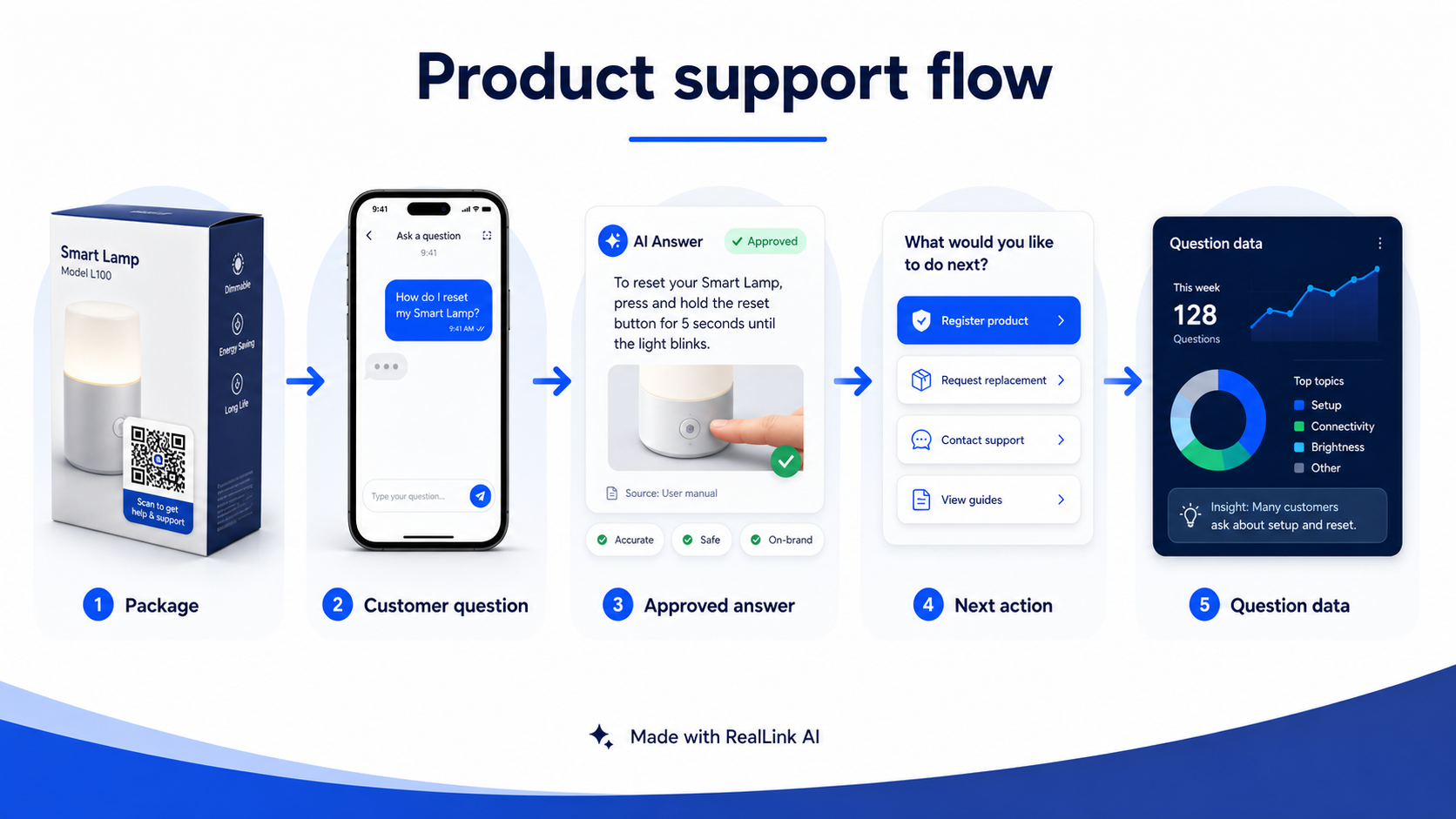
For RealLink AI, this is a strong fit. A product support QR code can connect to an AI employee trained on approved product information, warranty basics, care steps, setup notes, sizing guidance, parts details, and handoff rules. The customer can ask a natural-language question instead of hunting through a long page. The business can see which questions repeat and improve the next package, manual, or product page.
The Search Gap: Product QR Advice Often Stops Too Early
Current search results around product support QR codes tend to cluster around QR code creation, dynamic QR codes, smart packaging, 2D barcode changes, or packaging marketing ideas. Those topics matter, especially as product packaging moves toward richer digital experiences.
But many product teams still need a simpler answer: what should the customer get after scanning?
A product support QR code can do more than link to a static PDF. It can help a customer:
- set up the product correctly
- understand care, cleaning, storage, or maintenance
- check sizing, compatibility, ingredients, parts, or accessories
- find warranty and return instructions
- ask a quick question before calling support
- get help in another language
- reach a person when the question is sensitive, urgent, regulated, or final
That is the gap RealLink AI is designed to fill. The QR code gets the customer into the right place. The AI answer layer helps them move through the question without making the package, label, or manual carry every possible detail.
Packaging Is Already a Support Channel
Product support often happens in ordinary places: a kitchen counter, a bathroom shelf, a job site, a boutique fitting room, a garage, a hotel room, a clinic lobby, or the back room of a retail store. The customer is not always sitting at a laptop with your help center open.
Packaging, labels, and manuals stay close to the support moment. That makes them useful entry points for common product questions.
Use QR code product support when the customer may need:
- Setup help: first use, assembly, charging, installation, pairing, or account connection.
- Care help: cleaning, washing, storage, refills, maintenance, or shelf-life notes.
- Choice help: size, fit, color, ingredient, part, model, accessory, or compatibility questions.
- Trust help: warranty, return, safety, certification, materials, sourcing, or policy details.
- Next-step help: reorder, book service, request a replacement, register a product, or contact a person.
This does not mean every product needs a chatbot. It means every product should have a clear answer path for the questions customers predictably ask after purchase.
What a Product Support QR Code Should Open
The biggest mistake is sending a product QR code to a generic homepage. A homepage is built for discovery. A product support scan is usually built for relief.
Better destinations include:
- a product-specific support page
- a quick-start guide
- a setup video or visual checklist
- a care and maintenance page
- a warranty, return, or registration page
- a replacement parts or accessories page
- a multilingual question page
- a RealLink AI page where the customer can ask approved product questions
The best choice depends on the product. A skincare brand may need ingredient, routine, storage, and sensitivity handoff. A hardware seller may need setup, compatibility, safety boundaries, replacement parts, and quote requests. A food brand may need allergens, storage, recipes, shelf life, and wholesale inquiries. A local maker may need care instructions, shipping, returns, and custom-order questions.
If you use RealLink AI behind the QR code, keep the first screen focused. A simple opening works better than a broad welcome message:
Ask about setup, care, warranty, returns, or replacement parts for this product.
That tells the customer what the scan is for and keeps the support experience tied to the product in their hand.
The Product Question Map
Before printing a QR code, list the questions the scan should answer. This is where product support QR codes become more valuable than ordinary printed links.
- How do I set it up for the first time?
- What should I do before using it?
- How do I clean, wash, store, charge, or maintain it?
- Which model, size, color, refill, ingredient, or part do I have?
- What accessories or replacement parts work with it?
- What should I do if something looks wrong?
- Is this covered by warranty?
- How do returns, exchanges, or replacements work?
- Where can I reorder or buy more?
- When should I contact a person instead of using the self-serve answer?
For products with safety, health, financial, legal, or regulated implications, the support QR code should be conservative. Give general approved information, then route high-risk or final-decision questions to a person.
Where to Place Product Support QR Codes
Placement should follow the moment of need. Do not hide the QR code where customers will only see it before they need help.
Packaging panel
Use this for broad support: setup, care, warranty, returns, reorder, or full product details. Add a plain label like "Need help with setup or care? Scan here."
Manual cover or quick-start guide
Use this when the product has multiple steps. The scan can open a video, troubleshooting path, or RealLink AI answer page for setup questions.
Warranty card or registration card
Use this for warranty registration, proof-of-purchase instructions, return rules, replacement requests, and human handoff.
Care label or product tag
Use this for apparel, accessories, home goods, beauty products, plants, tools, and items where care instructions matter after purchase.
Receipt insert or thank-you card
Use this for small retailers and local makers. The scan can answer post-purchase questions, collect product questions, or guide customers to reorder and support.
In every case, keep the QR code scannable. DENSO WAVE guidance emphasizes that a QR code needs a clear quiet zone around the code. Higher error correction can help with damaged or partially obscured codes, but it is not a reason to crowd the design or cover critical scan areas.
Product Support QR Copy Examples
The label next to the QR code should be specific. It does not need to be clever. It needs to tell the customer why scanning is worth the effort.
- Scan for setup, care, and warranty help.
- Questions about this product? Scan and ask.
- Scan before you call support.
- Need the right part or refill? Scan here.
- Scan for quick-start help and troubleshooting.
- Ask about returns, exchanges, or replacement steps.
- Scan to ask in your language.
- Need help after opening? Scan here.
These examples are deliberately plain. Product support is not a place to make customers decode a marketing line. The customer has a question. The QR code should make the next step obvious.
How RealLink AI Fits Behind the QR Code
RealLink AI turns the product support QR code into a question path.
For a product business, that means you can prepare approved answers for repeated questions and let customers ask in natural language. Instead of searching a manual or waiting for a reply, the customer can ask about setup, care, parts, warranty basics, return steps, product options, or next actions.
The business benefit is not only faster answers. It is better product intelligence. If many customers ask about the same assembly step, the manual needs a clearer diagram. If customers keep asking whether a part is included, the packaging copy may be unclear. If customers ask about warranty coverage, the warranty card may need simpler language.
Use RealLink AI for approved, repeatable support topics:
- basic setup and first-use steps
- care, cleaning, storage, and maintenance
- compatibility, sizing, refills, parts, and accessories
- warranty and return process summaries
- reorder, booking, replacement, or support next steps
- multilingual customer questions
- question pattern review after launch
Keep humans in the loop for sensitive or final decisions: safety issues, urgent product failures, medical or legal implications, final warranty approval, refunds, complaints, and unusual cases.
Safety, Warranty, and Trust Boundaries
A product support QR code should improve access to information. It should not hide essential information.
Do not use a QR code to replace required safety warnings, legally required labeling, warranty terms that must be available to customers, or instructions that a person needs when they do not have a phone, battery, signal, or internet access.
Use the QR code to add:
- updated FAQs
- videos and visual guidance
- translations
- model-specific details
- human support routing
- clear next steps
The trust rule is simple: the printed product should still stand on its own for essential warnings and required information. The QR experience should make support easier, richer, and more current.
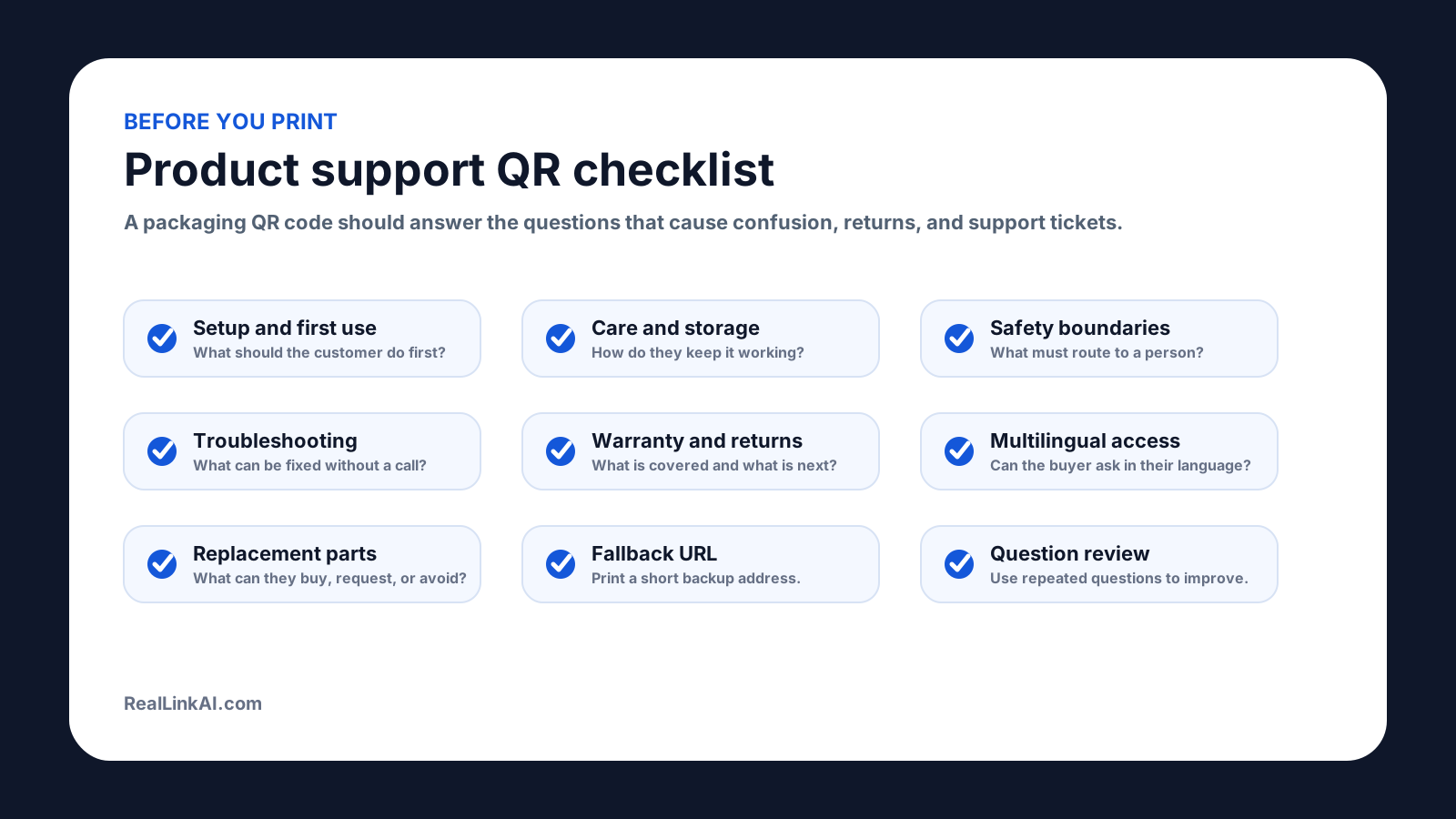
Before You Print: Product Support QR Checklist
Use this checklist before adding a QR code to packaging, labels, manuals, or inserts:
- Choose one scan promise: setup, care, warranty, returns, troubleshooting, reorder, or ask a question.
- Make the destination product-specific, not a generic homepage.
- Prepare approved answers for the top 10 customer questions.
- Add human handoff rules for safety, complaints, refunds, warranty decisions, and unusual cases.
- Use a short fallback URL if the printed space allows it.
- Keep the QR code high contrast with a clear quiet zone.
- Test a printed sample with multiple phones before production.
- Check the scan path after packaging ships, not only before launch.
- Review repeated questions monthly and update the support page, AI answers, manual, or package copy.
A Simple 7-Day Setup Plan
You do not need a full enterprise support center to start. For a small product business, begin with one product and one support moment.
- Day 1: Choose the product that creates the most repeated questions.
- Day 2: List the top questions from emails, calls, reviews, returns, staff notes, and DMs.
- Day 3: Write approved answers in plain language.
- Day 4: Decide which questions require human handoff.
- Day 5: Create the QR destination, such as a RealLink AI answer page or product support page.
- Day 6: Generate the QR asset, place it near the support message, and add a fallback URL if space allows.
- Day 7: Print a sample, scan it from the real distance, and fix anything confusing before production.
After the first batch ships, review what people asked. That question data is often the fastest way to improve the next manual, label, insert, product page, or support script.
Turn packaging into a support path
Use one product QR code to let customers ask setup, care, warranty, return, and troubleshooting questions, then use the repeated questions to improve your next package or manual.
Sources and Further Reading
- DENSO WAVE: Point for determining the code area
- DENSO WAVE: Error correction feature
- GS1 US: Sunrise 2027
- FTC business guidance: Warranties
- FTC Consumer Advice: Scammers hide harmful links in QR codes
- U.S. Consumer Product Safety Commission: Business Education
FAQ
What is QR code product support?
QR code product support means placing a QR code on packaging, manuals, labels, receipts, inserts, or product tags so customers can quickly get help with setup, care, troubleshooting, warranty, returns, parts, or next steps after purchase.
What should a product support QR code link to?
It should link to the most useful help path for that product: a focused support page, setup guide, care instructions, video, approved question-answer experience, warranty or return information, parts page, or human handoff path. Avoid sending customers to a generic homepage.
Can a QR code replace printed product instructions?
Usually no. A QR code can add richer help, updates, translations, videos, and question paths, but it should not replace required safety warnings, regulatory information, warranty terms, or essential instructions that customers need without a phone or internet connection.
Where should a product support QR code be placed?
Place it where the support moment happens: on the package panel, quick-start insert, manual cover, warranty card, care label, product tag, receipt insert, or replacement-parts card. Keep the QR code high contrast, leave a clear quiet zone, and add a short plain-language label.
How can RealLink AI help with product support QR codes?
RealLink AI can sit behind the QR code as an AI employee trained on approved product information. Customers can ask setup, care, compatibility, warranty, return, and next-step questions, while sensitive or final-decision cases can be routed to a person.
Let customers ask after purchase
Create a RealLink AI page for one product, connect it to your QR code, and review the repeated questions customers ask after opening the box.