
QR Code Generator vs AI Answer Page
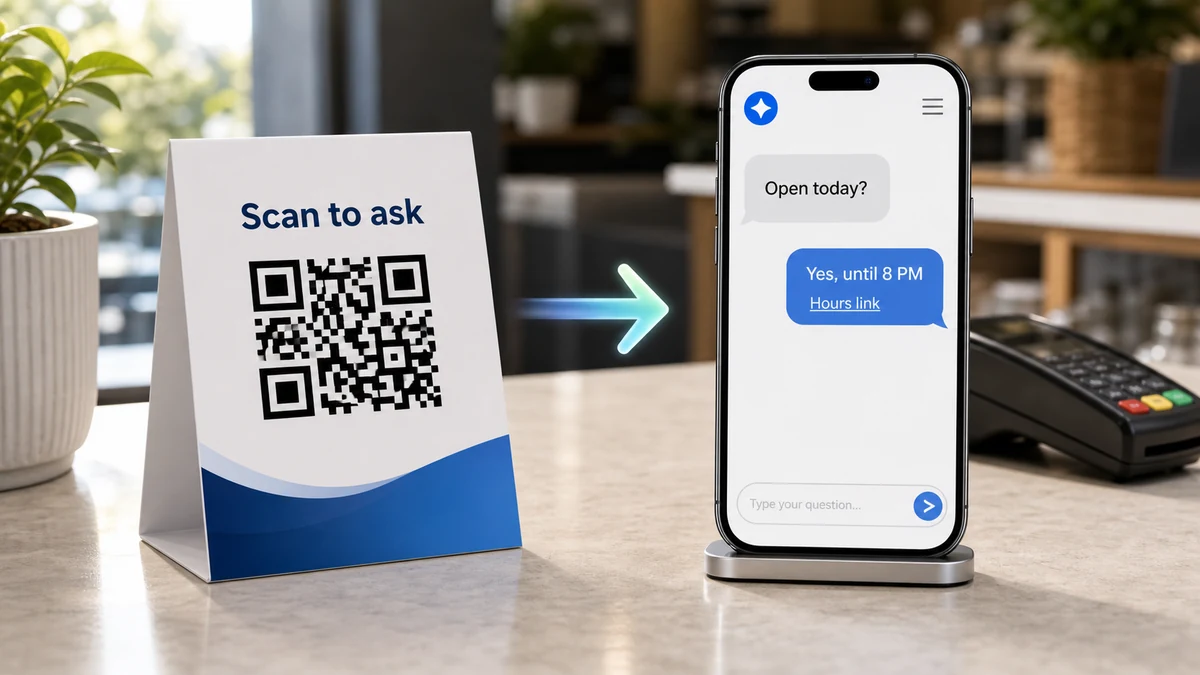
A QR code generator creates the scannable code. An AI answer page is what customers reach after the scan when they need answers, guidance, and a clear next step.
TL;DR
A QR code generator is enough when you only need to send people to one fixed destination, such as a menu, coupon, PDF, contact page, or booking link. An AI answer page is better when customers scan because they have questions, need help choosing, want pricing or policy clarity, or may not be ready to call. The real decision is not "QR code or AI." The decision is whether the scan should open a static destination or a customer answer point that can guide the next step and reveal what people keep asking.
Key Takeaways
| Takeaway | What it means for a small business |
|---|---|
| A QR code generator solves access. | It makes a scannable bridge from print to a URL, file, menu, form, coupon, or landing page. |
| An AI answer page solves uncertainty. | It lets customers ask about price, fit, hours, service area, policies, booking, directions, and next steps, then use embedded links or the hamburger menu when needed. |
| A static QR code can still be the right choice. | Use it for simple, stable, low-question destinations like a menu PDF, Wi-Fi login, review link, or event RSVP page. |
| The scan destination matters more than the code design. | A beautiful QR code still fails if it sends people to a confusing, generic, or incomplete page. |
| Customer questions are useful business data. | Repeated questions show which printed materials, web pages, offers, or operations need clearer answers. |
What is the short answer?
A QR code generator creates a scannable code that opens a destination. An AI answer page is the destination: a public answer point where customers can ask questions, get approved business information, use embedded answer links or hamburger-menu links when needed, and help the business see question patterns after scans.
Use a QR code generator when the destination is clear. Use an AI answer page when the customer may need help before acting.
That distinction matters because many businesses treat the QR code itself as the strategy. It is not. The QR code is only the doorway. The page behind it is where trust, clarity, and conversion happen.
Google's helpful content guidance says useful pages should help people achieve a real goal, not merely exist for search visibility. The same rule applies to QR experiences. A scan should help the customer do something: decide, compare, ask, book, visit, call, buy, or understand the next step.
Why does this problem happen?
This problem happens because QR codes are easy to create but hard to make useful. Many businesses generate a code, place it on a flyer, menu, package, sign, or card, and assume the scan equals engagement. In reality, the scan only starts the customer journey.
A QR code generator usually answers one technical question: "Can we make this URL scannable?"
That is useful. It is also incomplete.
After the scan, the customer may still wonder:
- Is this the right page?
- How much does this cost?
- Is this offer still valid?
- Do you serve my area?
- What happens if I book?
- Can I ask before I call?
- Is this business trustworthy?
- Can I get this information in my language?
- Is there a faster next step?
If the scan opens a generic homepage, the customer has to search again. If it opens a PDF, the customer has to scroll. If it opens a long FAQ page, the customer has to match their question to your wording. If it opens a form too early, the customer may leave because they are not ready to submit information.
The result is a strange marketing gap: the QR code works, but the customer still does not move.
What do most QR code comparison guides miss?
Most QR code guides compare static codes, dynamic codes, colors, logos, tracking, file types, and pricing. Those details matter, but they miss the more important question: what customer uncertainty exists after the scan, and can the destination answer it at that moment?
This is the gap RealLink AI is built around.
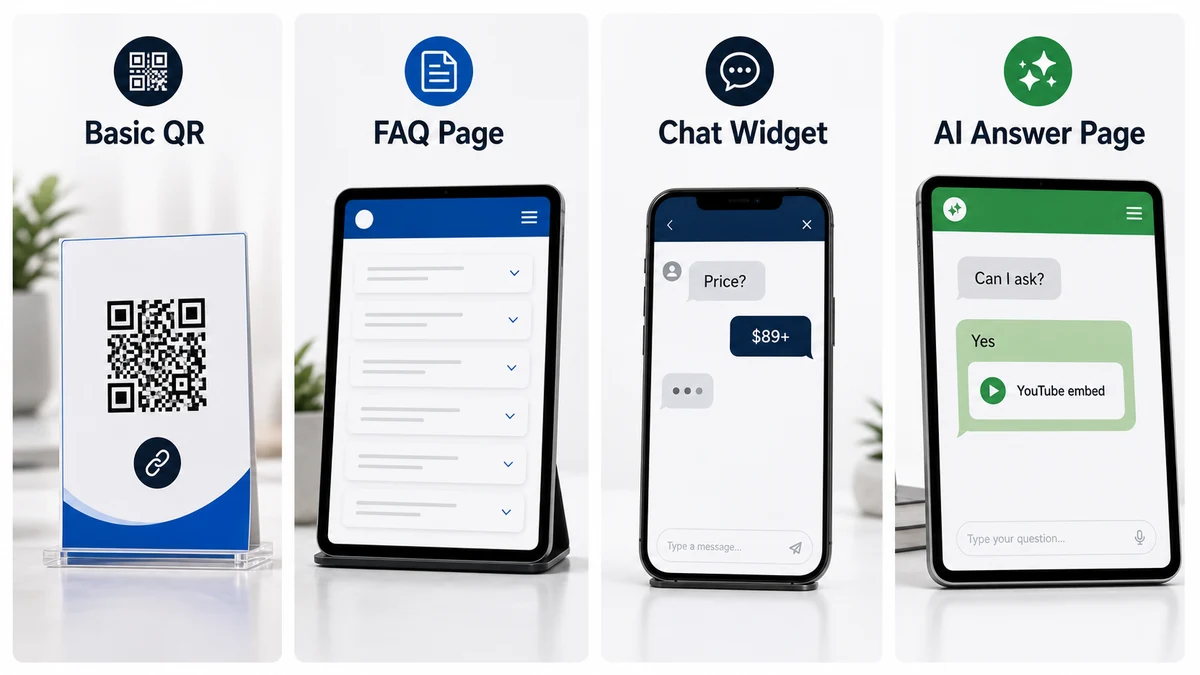
A QR code can send people to almost anything:
- a menu
- a PDF
- a homepage
- a booking link
- a coupon
- a product page
- a review link
- a video
- a form
- a FAQ page
- a chat widget
- an AI answer page
Most QR code tools stop after the link is encoded. The better strategic question is: "What is the customer trying to resolve when they scan?"
If a diner scans a table tent, they may need allergy, pickup, parking, or wait-time information. If a homeowner scans a service flyer, they may need price range, service area, appointment timing, or proof. If a tourist scans a brochure, they may need directions, language support, hours, ticket rules, or weather policies.
A QR code generator does not answer those questions. It only points to whatever you built. An AI answer page is designed to become that answer point.
What questions do customers actually ask after scanning?
Customers rarely scan because they love technology. They scan because the printed material, sign, packaging, table tent, card, or display created a need for one more answer.
The common question groups are price, fit, trust, timing, policy, language, and next step. A restaurant guest may ask about allergens or pickup timing. A homeowner may ask about service area and diagnostic fees. A buyer may ask about proof, warranty, minimum order, or who to contact. A tourist may ask in another language about directions, hours, accessibility, or ticket rules.
A QR code generator does not know which of those questions matters. It only points to a destination.
- Price: What does this usually cost, and what changes the price?
- Fit: Is this for my situation, location, product, home, group, or business?
- Trust: Can I see proof, examples, credentials, policies, or a real human path?
- Timing: What happens if I scan after closing, before booking, or after buying?
- Policy: What about returns, refunds, allergies, accessibility, weather, pets, or special cases?
The FTC has warned that QR codes can hide harmful links, so businesses should make QR destinations feel recognizable and trustworthy. That means using a clear scan promise, a recognizable domain, and a destination that matches the printed context.
How do QR code generators and AI answer pages compare?
A QR code generator is a production tool. It helps you create and style the scannable code. An AI answer page is a customer experience layer. It helps people ask questions, receive approved answers, and move to the next step after they scan.
Quick Comparison Table
| Category | QR code generator | AI answer page |
|---|---|---|
| Primary job | Create a scannable code | Answer customer questions after the scan |
| Best for | Simple links, menus, PDFs, review links, coupons, event pages | High-question moments, service fit, pricing clarity, multilingual help, guided next steps |
| Customer experience | Scan -> open fixed destination | Scan -> ask -> get answer -> choose next step |
| Setup time | Usually minutes | Usually longer than a basic code because answers, buttons, and boundaries must be prepared |
| Typical cost | Often free or low-cost for simple static codes; dynamic codes may be paid | SaaS subscription or platform cost, depending on usage and features |
| Ongoing maintenance | Update the destination page or dynamic redirect | Update approved business info, answer topics, handoff rules, embedded answer links, and hamburger-menu links |
| Handles unique questions | No | Yes, within trained business information and boundaries |
| Tracks scan behavior | Sometimes, especially with dynamic QR services | Should track customer question patterns and useful next-step signals |
| Multilingual support | Only if the destination supports it | Can support customer questions in multiple languages when configured |
| Risk | Easy to send traffic to a weak page | Needs careful answer boundaries and current business information |
| Best metric | Scans, redirects, campaign visits | Questions, answered topics, next-step clicks, knowledge gaps, repeated friction |
What is the bad solution vs better solution?
The bad solution is not "using a QR code." The bad solution is treating the QR code as the end of the strategy. A better solution matches the destination to the customer's uncertainty, the business goal, and the moment where the scan happens.
| Scenario | Bad solution | Better solution | Why it works |
|---|---|---|---|
| Flyer for a cleaning service | QR code opens the homepage | QR code opens an answer page for price range, rooms, supplies, timing, and booking steps | The customer can check fit before calling |
| Restaurant table tent | QR code opens a PDF menu only | QR code opens menu details plus questions about allergens, pickup, hours, parking, and popular items | Guests get specific answers without interrupting staff |
| Real estate open house sign | QR code opens a generic agent profile | QR code opens property FAQ, tour links, showing times, neighborhood notes, and agent handoff | The buyer gets property context, not just a contact card |
| Product packaging insert | QR code opens the brand homepage | QR code opens setup, warranty, care, returns, and troubleshooting answers | The customer gets post-purchase help immediately |
| Event poster | QR code opens a social profile | QR code opens schedule, parking, tickets, age rules, accessibility, weather plan, and RSVP | The scan removes attendance blockers |
| Professional services card | QR code opens a long services page | QR code opens a consultation prep answer point with process, pricing logic, documents, and booking link | The lead can understand the first step before calling |
Which option is better by business type?
The best option depends on how many questions the customer has before action, how often details change, how much the next step matters, and whether the business benefits from learning what customers ask. Static QR codes are fine for simple destinations. AI answer pages are stronger when uncertainty blocks action.
Decision Table by Business Type or Use Case
| Business or use case | Choose a QR code generator when... | Choose an AI answer page when... | Main decision factor |
|---|---|---|---|
| Restaurant or cafe | You only need to open a fixed menu, Wi-Fi login, or review link | Guests ask about allergens, parking, pickup, hours, substitutions, groups, or language | Service interruptions and repeated questions |
| Home services | The flyer only needs to open a quote form | Customers need price range, service area, project fit, preparation, photos to send, or appointment expectations | Pre-call uncertainty |
| Retail shop | You need a sale coupon, product page, or loyalty signup | Customers ask about sizes, returns, pickup, stock boundaries, gift options, or compatibility | Product choice and policy clarity |
| Real estate | The QR code only opens a listing page | Buyers ask about open-house details, tour links, neighborhood context, disclosures, and agent next steps | High-consideration decision support |
| Clinic or wellness office | You only need to open booking or intake | Visitors ask about services, parking, hours, preparation, general eligibility, and what happens after booking | Trust and process clarity |
| Hotel, tourism, attraction | You only need a map or brochure | Visitors ask in different languages about tickets, directions, luggage, accessibility, transport, or policies | Multilingual and logistics questions |
| Product packaging | You only need a warranty registration form | Buyers ask about setup, care, safety, returns, troubleshooting, or compatible accessories | Post-purchase support |
| Events | You only need ticket purchase | Attendees ask about schedule, parking, age rules, weather, food, accessibility, and what to bring | Attendance blockers |
| Professional services | You only need a calendar link | Prospects need fit, pricing logic, documents, process, confidentiality, or first-call expectations | Trust before consultation |
What should you check before choosing?
Choose based on the customer journey, not the tool category. If the scan needs only one destination, a generator may be enough. If the scan opens a moment of doubt, build an answer path before you print or distribute the QR code.
Step-by-Step Checklist
- Define the scan moment.Where will the QR code appear: flyer, sign, menu, package, card, brochure, receipt, poster, table tent, or website?
- Define the customer's likely intent.Are they trying to view, decide, compare, ask, book, call, buy, get directions, or troubleshoot?
- Count the likely questions.If there are only one or two simple questions, a static page may work. If there are five or more common questions, consider an answer page.
- Decide whether answers change.Static code is fine for stable information. Dynamic redirects or answer pages help when offers, hours, policies, or campaigns change.
- Identify the next step.Is the next step call, book, quote, visit, buy, RSVP, ask, download, or get support?
- Prepare trust signals.Add business name, domain, contact method, location or service area, proof, and policy clarity.
- Set handoff boundaries.Decide which questions require a human: final quotes, medical advice, legal advice, complaints, emergencies, refunds, regulated decisions, or sensitive personal issues.
- Choose the destination.Use a QR code generator for simple routing. Use an AI answer page when the destination must answer and guide.
- Test the printed experience.Scan from real distance, on real paper, in real lighting, with more than one phone.
- Review what happened.Look at scans, questions, next-step clicks, and repeated question patterns.
What are concrete examples?
Concrete examples make the difference clearer. In each case below, the basic QR code is not wrong. It becomes weak only when the customer needs more than a static destination can provide.
1. Restaurant menu QR code
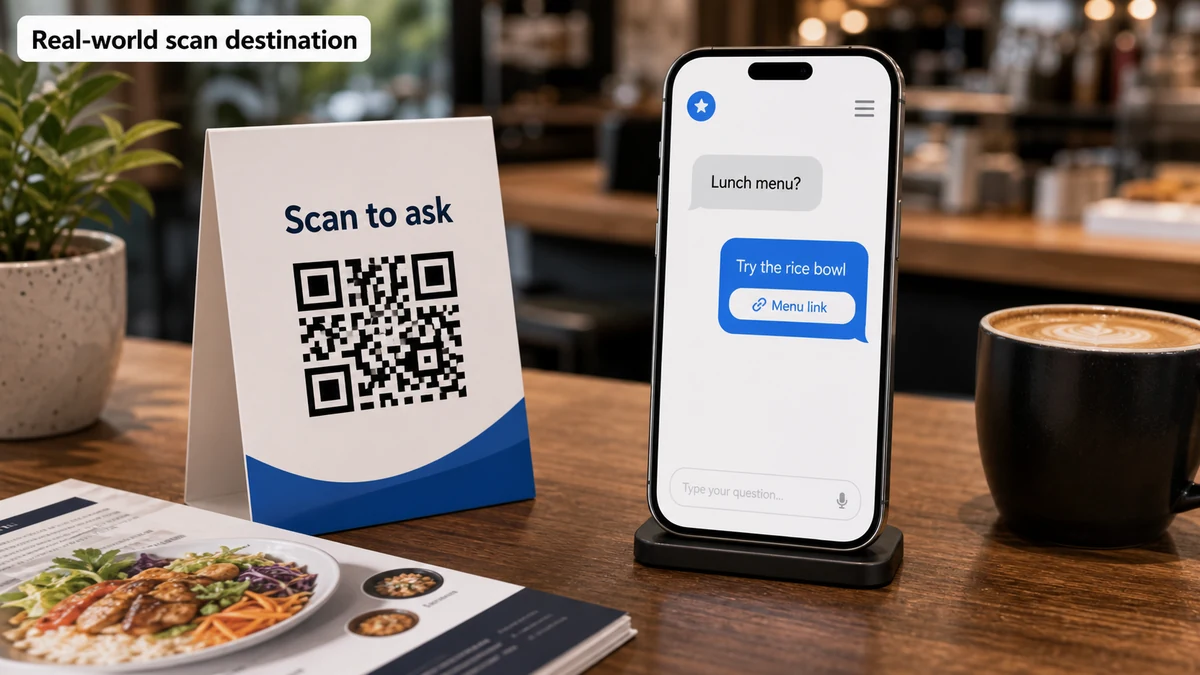
A basic QR code generator works if the goal is "open the menu." That may be enough for a small cafe with a stable menu and few customer questions.
An AI answer page works better when guests often ask about allergens, vegetarian options, parking, pickup timing, reservations, catering, group size, or current specials. It can answer routine questions and guide guests to call, order, view directions, or book through the official link.
2. Home service flyer
A basic QR code can open a quote form. That works when the reader is already convinced and simply needs to submit contact details.
An AI answer page works better when homeowners hesitate before calling. They may ask about service area, diagnostic fee, price range, photos to send, appointment windows, warranty, emergency boundaries, or whether the job is too small. Those answers can turn a cold flyer scan into a warmer lead.
3. Product packaging support
A basic QR code can open a support page or PDF manual. That is fine for simple products with clear instructions.
An AI answer page works better when customers ask different questions based on setup stage, model, accessory, care issue, return policy, or troubleshooting symptom. It can answer approved support questions and route warranty, safety, refund, or complex issues to staff.
4. Real estate open house sign
A basic QR code can open the property listing. That is useful for photos, square footage, and agent contact.
An AI answer page works better when visitors ask about showing times, parking, neighborhood resources, school boundaries, financing preparation, tour links, disclosures, and next steps. It should route legal, negotiation, financing, or representation questions to the agent.
How can you do it without RealLink AI?
You can build a strong QR experience without RealLink AI by combining a reliable QR generator, a focused landing page, a well-written FAQ, clear buttons, analytics, and a regular review process. The tradeoff is that you must manually create and maintain the answer system.
Here is the non-RealLink AI approach:
- Choose a QR code generator.Use a static code for permanent destinations. Use a dynamic QR provider if you need editable destinations or scan reporting.
- Build a focused landing page.Do not send every scan to your homepage. Match the page to the scan context: menu, flyer, packaging, table tent, sign, card, or event.
- Write an answer-first FAQ.Put the most common customer questions near the top. Use the customer's language, not internal categories.
- Add trust and next-step paths.Show the business name, domain, policy links, human handoff, and clear links or forms for the next action.
- Track and review behavior.Use campaign URLs, analytics, form notes, calls, staff comments, DMs, support messages, and scan reports.
- Update monthly.If people keep asking the same thing, move that answer higher on the page and update printed copy next time.
This approach works, but it requires discipline. The hardest part is keeping the destination useful as customer questions change.
How does RealLink AI make it easier?
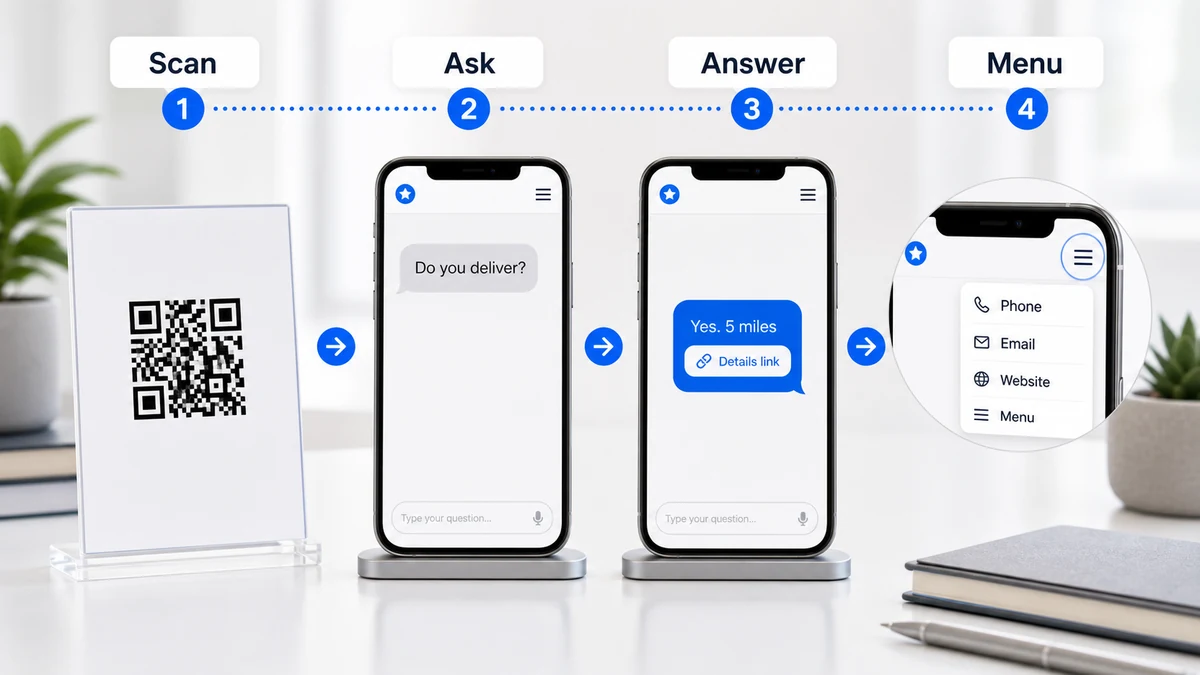
RealLink AI makes the QR destination easier by turning it into a public AI answer page trained on approved business information. Customers can scan, ask natural-language questions, receive useful speech-bubble answers, use embedded links or the hamburger menu when needed, and create question data the business can review.
RealLink AI is not positioned here as "a chatbot for everything." The stronger framing is an AI answer page or AI answer point. It is public, linkable, QR-friendly, and designed for offline-to-online moments.
With RealLink AI, a business can:
- publish an AI answer page behind a QR code or public link
- answer routine questions using approved business information
- place plain URL links or configured YouTube and TikTok embeds inside answer bubbles when useful
- keep phone, email, address, homepage, website, menu, and similar business links inside the hamburger menu
- support multilingual customer questions when configured
- set business hours, daily limits, session limits, blocked topics, greeting, theme, logo, and handoff behavior
- review customer question patterns as operational and marketing insight
The business still needs to provide accurate information and set boundaries. RealLink AI should not be used to invent prices, promise live availability, provide regulated advice, or replace human judgment. For final quotes, medical advice, legal judgment, emergencies, refunds, complaints, and sensitive situations, route to a person or official channel.
The advantage is that the business does not have to rebuild a separate landing page for every question-heavy QR use case. One answer page can become a flexible scan destination, and the questions people ask can reveal what the next flyer, sign, FAQ, product page, or staff script should explain more clearly.
FAQ
Is a QR code generator the same as an AI answer page?
No. A QR code generator creates the scannable code that opens a destination. An AI answer page is a destination that can answer customer questions, show embedded answer links or hamburger-menu links when needed, and help the business understand what people ask after scanning.
When is a basic QR code generator enough?
A basic QR code generator is enough when the scan should open one clear and stable destination, such as a menu, review link, coupon, event page, Wi-Fi login, PDF, directions page, or booking link. It works best when customers do not need much explanation before acting.
When should a business use an AI answer page instead?
Use an AI answer page when customers scan because they need help deciding. Common triggers include price questions, service fit, policies, location details, hours, preparation, product support, booking steps, multilingual questions, or uncertainty about what happens next.
Does an AI answer page replace a website?
No. A website is still useful for broad discovery, SEO, brand trust, and detailed pages. An AI answer page is better understood as a focused answer point for a specific customer moment, especially after a QR scan from print, signage, packaging, menus, cards, or local marketing materials.
Does an AI answer page replace a chatbot?
Not exactly. A generic chatbot is often attached to a website. An AI answer page is a public page that can stand on its own behind a QR code or link. It should feel like a simple question-and-answer destination, with approved answers, embedded answer links, and hamburger-menu links for business contact options.
Which option is cheaper?
A basic static QR code is usually cheaper at the start because many generators are free or low-cost. An AI answer page usually costs more because it includes setup, answers, controls, and usage. The better question is whether unanswered customer questions are costing calls, bookings, visits, support time, or trust.
Which option is faster to set up?
A QR code generator is faster. You can often create a code in minutes if the destination already exists. An AI answer page takes more preparation because you need approved business information, common questions, embedded links, hamburger-menu links, boundaries, and a review process.
Can I use both together?
Yes. In many cases, the best setup is a QR code generated for print or signage that points to an AI answer page. The QR code handles access; the AI answer page handles the customer's question and next step.
What are the biggest risks of using only a QR code generator?
The biggest risk is sending people to a weak destination: a generic homepage, long PDF, outdated page, confusing form, or page that does not answer the question that caused the scan. QR codes can also create trust concerns if the destination is unclear or does not match the printed promise.
What are the biggest risks of using an AI answer page?
The biggest risks are inaccurate training information, unclear answer boundaries, overpromising live availability, and poor human handoff. An AI answer page should answer routine, approved, repeatable questions and route sensitive or final-decision topics to a person.
Should I use FAQPage structured data for this comparison?
You can include FAQPage schema if the visible FAQ is useful and the page policy supports it, but do not expect FAQ rich results for a normal business page. Google Search Central says FAQ rich results are limited to well-known, authoritative government or health-focused sites. The FAQ still helps readers and AI extraction when written clearly.
What metrics should I track after launch?
Track scan volume, destination visits, question topics, embedded link clicks, hamburger-menu interactions, bookings, quote requests, calls, unanswered questions, language demand, and repeated friction. For an AI answer page, question patterns are often more useful than scan count alone.
Sources and further reading
Ready to choose the page after the scan?
If you need more than a static page or a basic QR code, try an AI answer page that can guide customers and collect question patterns.
Last updated and author note
Last updated: 2026-06-03
Author/founder note: This guide was written from the RealLink AI point of view: a QR code is not the strategy; what happens after the scan is. RealLink AI is built for small businesses that use QR codes and public links on flyers, signs, menus, packaging, cards, brochures, and local marketing materials, then want to answer customer questions and learn from the patterns those questions reveal.