صحیح وقت پر جواب
آپ مصروف ہوں تب بھی گاہک کو دلچسپی برقرار رہنے کے دوران مفید جواب مل جاتا ہے۔
 RealLink AI
ملاقات کی بکنگ AI
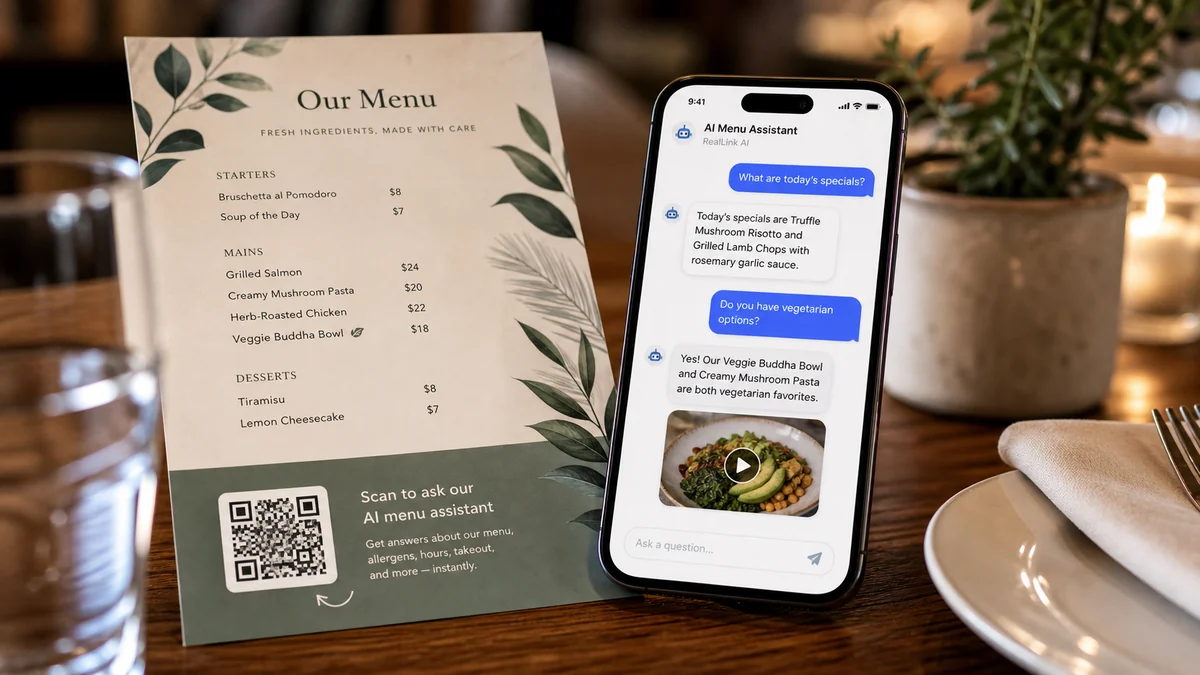
زائرین QR کوڈ اسکین کر سکتے ہیں، سوال پوچھ سکتے ہیں، تاریخ اور وقت کا انتخاب کر سکتے ہیں، اور اکاؤنٹ بنائے بغیر بکنگ کی درخواست بھیج سکتے ہیں۔ مالکان درخواست کا جائزہ لے سکتے ہیں، اس کی حیثیت کو اپ ڈیٹ کر سکتے ہیں، اور دیکھ سکتے ہیں کہ کون سا QR پلیسمنٹ اسے لایا ہے۔
مختصر جائزہ
آپ مصروف ہوں تب بھی گاہک کو دلچسپی برقرار رہنے کے دوران مفید جواب مل جاتا ہے۔
گاہک کو تلاش میں ڈالے بغیر درست لنک، استفسار، بکنگ یا رابطے کے طریقے تک پہنچائیں۔
بار بار آنے والے سوالات بتاتے ہیں کہ صفحے، پرنٹ مواد اور خدمت میں کیا بات زیادہ واضح کرنی چاہیے۔
خلاصہ
لوگ اکثر جاننا چاہتے ہیں کہ قیمت کی حد، مدت، مقام، منسوخی کے قواعد، پارکنگ، یا بکنگ سے پہلے کیا تیاری کرنی ہے۔ RealLink AI پہلے ان سوالوں کا جواب دیتا ہے اور وزیٹر کے تیار ہونے پر بکنگ فارم دکھاتا ہے۔
فٹ
وزٹ کا وقت، گروپ کا سائز، الرجی کے نوٹس اور خصوصی درخواستیں وصول کریں۔
حساس تفصیلات پوچھے بغیر ترجیحی وقت اور سادہ ملاقات کا مقصد حاصل کریں۔
زائرین کو تاریخ، وقت، گروپ کا سائز، اور رابطے کا طریقہ منتخب کرنے دیں۔
بک ڈیمو، مشاورت، دیکھنے، یا تنصیب کے مباحثے.
بہاؤ
QR کوڈ اسکین کریں یا عوامی AI لنک کھولیں۔
دستیابی، قیمت، مدت، پارکنگ، قواعد، یا تیاری کے بارے میں پوچھیں۔
بکنگ فارم میں تاریخ، وقت، رابطے کا طریقہ اور نوٹ منتخب کریں۔
جمع کرانے کے بعد بکنگ اسٹیٹس کا لنک محفوظ کریں۔
مالک درخواست کا جائزہ، تصدیق، مکمل، منسوخ یا مسترد کرتا ہے۔
مالک
دستیاب دن اور گھنٹے، سلاٹ کی لمبائی، صلاحیت، اور کم از کم نوٹس۔
بٹن کا متن، فارم کا عنوان، گاہک کی ہدایات، منسوخی کا نوٹ، اور رازداری کے الفاظ۔
ریزرویشن کی حیثیت، کیلنڈر کا منظر، حالیہ درخواستیں، اور QR سورس ٹیگز۔
کون سی QR پلیسمنٹ وزٹ، سوالات، پوچھ گچھ اور بکنگ بناتے ہیں۔
FAQ
پہلے اسے ہلکے وزن کی بکنگ کی درخواست کے طور پر استعمال کریں۔ مالک درخواست کو چیک کرنے کے بعد تصدیق کر سکتا ہے۔
ریزرویشن ریکارڈ 30 دنوں کے لیے رکھا جاتا ہے اور پھر اسے برقرار رکھنے کے عمل سے ہٹا دیا جاتا ہے۔
اگلا مرحلہ
زائرین کو پہلے پوچھنے کا ایک آسان طریقہ دیں، وقت کا انتخاب کریں، اور درخواست بھیجیں جب تک کہ ان کی دلچسپی ابھی تازہ ہو۔
ایک بکنگ AI صفحہ بنائیں